
Introducing MCP for SPM
 New article articles in ServiceNow Community
·
Oct 21, 2026
·
article
New article articles in ServiceNow Community
·
Oct 21, 2026
·
article
Introducing MCP for SPM
Introduction
AI clients are quickly becoming where work starts. Goal owners, portfolio managers, and project managers are already asking Claude, Microsoft Copilot, and Gemini to summarize, analyze, and plan, but the answers are only as good as the data behind them. Out-of-the-box MCP for SPM closes that gap.
MCP for SPM is a pre-built Model Context Protocol (MCP) server for Strategic Portfolio Management. It connects your ServiceNow goals, portfolio plans, and projects to any MCP-compatible AI client, so your teams can ask a question in plain language and get an answer from live ServiceNow data, without switching between workspaces, dashboards, and chat.
The most important thing to know first: MCP for SPM does not bypass anything. Every request runs as the signed-in user, with the same ACLs, field-level security, and audit trail you rely on in Strategic Portfolio Management. Users can only see and do through their AI client what they can already see and do in ServiceNow.
Watch the Demo
See MCP for SPM in action in Claude across three roles: a project manager diagnosing why a project is slipping, a goal owner checking live goal health by business unit, and a portfolio manager asking which projects are at risk.
What's Included
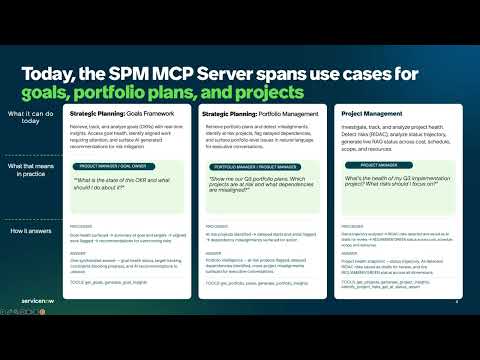
With Brazil Release MCP for SPM ships eight tools across three areas. Retrieval tools bring records into your AI client; AI tools call the same Now Assist skills available in Strategic Planning Workspace.
| Tool | What it does | Example prompt |
|---|---|---|
| Goals | ||
| Retrieve goals | Pulls goals (objectives) matching any filter — owner, timeline, or status — into your AI client for further reasoning. | "Show me goals owned by Adam." |
| Goal insights AI | Summarizes goal health, the goal and its targets, aligned work that needs attention, and recommendations for overcoming risks — in a single query. | "What's the state of this OKR and what should I do about it?" |
| Portfolio plans | ||
| Retrieve portfolio plans | Retrieves portfolio plans with flexible filtering, ready for summarization or cross-referencing. | "Show me the portfolio plans I own." |
| Portfolio insights AI | Surfaces at-risk projects, delayed start and end dates, and misalignments across a portfolio plan in plain language, ready for executive conversations. | "Which projects in this portfolio are at risk?" |
| Project management | ||
| Retrieve projects | Pulls projects matching any filter — owner, timeline, or status — into your AI client. | "List my active projects ending this quarter." |
| Project insights AI | Detects risks, analyzes status trajectory, and recommends next steps for a single project — the same insights available in Strategic Planning Workspace. | "Why is this project off track, and what should I do first?" |
| RIDAC risk detection AI | Scans a project for risks, issues, dependencies, assumptions, and changes, and saves them to the risk table as AI draft entries for a person to review, approve, or reject before they're committed. | "Scan this project for risks and dependencies." |
| AI status report (RAG) AI | Generates on-demand Red, Amber, and Green status across resources, cost, schedule, and scope from live project data using Now Assist. | "Create a status report for this project." |
Who It's For
Below are some users that get value today:
Goal owner / ePMO
Check live goal health, targets, and the aligned work that needs attention — by business unit if needed — and get recommendations to unblock risk.
Tools: Goals: Retrieve goals, Goal insights
Portfolio manager
Ask which projects are at risk, delayed, or misaligned across a portfolio plan, and get answers ready for leadership reviews.
Tools: Portfolio plans: Retrieve portfolio plans, Portfolio insights
Project manager
Diagnose why a project is slipping, generate RAG status reports, and draft RIDAC entries for review — without leaving the AI client.
Tools: Projects: Retrieve projects, Project insights, RIDAC risk detection, AI status report (RAG)
Platform owner / AI governance
Decide whether to install the app, approve which AI clients may connect, control which tools are exposed, and monitor Assist consumption.
Tools: MCP Server Console
Getting Started
What you need in place:
- An SPM Pro Plus, Advanced, or Prime license
- The latest Model Context Protocol Server store app
- The Now Assist for SPM parent store app, current version
- The MCP for SPM app from the ServiceNow Store
- An MCP-compliant AI client approved for enterprise use
Step-by-step documentation:
Frequently Asked Questions
Q: Which AI clients are supported?
A: Any standards-compliant MCP client, including Claude, Microsoft Copilot, and Gemini.
Q: Which license do I need? Is there a separate SKU?
A: There’s no separate SKU. MCP for SPM is available with SPM Pro Plus, Advanced, or Prime.
Q: Do users need new roles?
A: No. Tools run in the authenticated user’s session, so the SPM roles they already have determine what they can retrieve. An administrator is needed to install the store apps, set up the OAuth integration, and choose which tools and clients are allowed.
Q: Can administrators control what’s exposed?
A: Yes. MCP for SPM is built on MCP Server Console, ServiceNow’s tool execution layer, and inherits its governance, authentication, and observability model. Administrators choose which tools are exposed and which AI clients can invoke them.
Q: Can the AI client see data a user can’t see in ServiceNow?
A: No. ACLs, role-based access, and field-level security apply per user regardless of how the request arrives. A user can’t see or do anything through MCP that they couldn’t see or do in the UI.
Q: Is there an audit trail?
A: Yes. Every tool call logs caller identity, tool name, inputs, success or failure, error code, and latency.
Resources
https://www.servicenow.com/community/spm-articles/introducing-mcp-for-spm/ta-p/3612786