
Automation Discovery Advanced Tips for ITSM, HRSD, and ITOM
Automation Discovery is a quick way to use machine learning to find potential automation opportunities in your data. When I say quick you can install the application, configure, run the report, and have results in 30 minutes. Automation Discovery looks at your text fields (typically short description or description) and matches your incidents/cases against an automation class in a ServiceNow automation taxonomy. The taxonomy is managed by ServiceNow.
If you are new to Automation Discovery you can read the below articles for a quick start on installation and creation of your first automation discovery report.
Installing Automation Discovery
Interpreting an Automation Discovery Report
Tip 1: Install all the right stuff.
To get started search the ServiceNow store for the latest version of Automation Discovery. Make sure to read the pre-requisites. You will need the Predictive Intelligence, Virtual Agent, and NLU plugins installed.
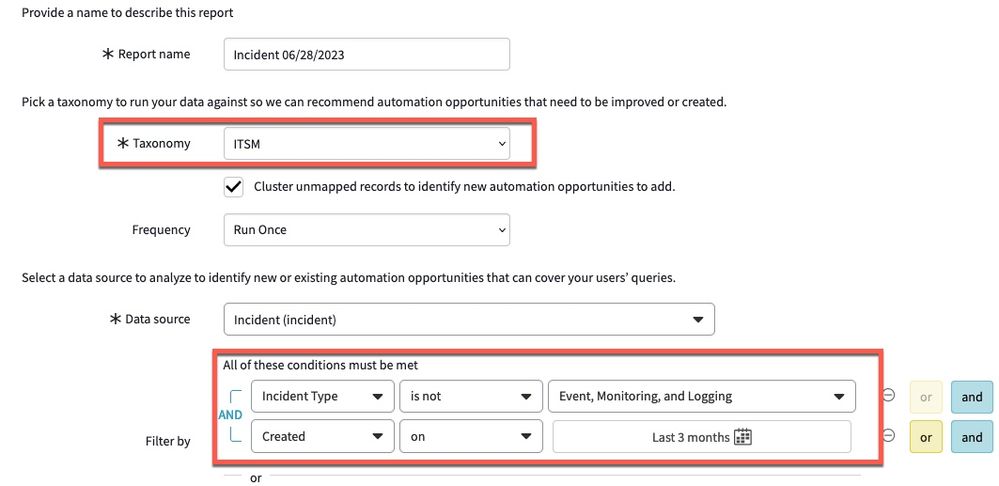
Tip 2: Configure an Automation Discovery report to identify Virtual Agent Automation Opportunities.
In this scenario you want to focus on incidents/cases created by humans and not created by monitoring software. Below I have an example of filtering out any incidents created by a monitoring solution. Also note, the default max limit that you can send to Automation Discovery is 500k records.

Tip 3: Reduce the number of incidents created by monitoring solutions.
In this use case you want to reduce the number of incidents created by monitoring solutions. All those incidents distract from the real event that could cause an outage of a services or application. By using the Automation Discovery Predictive AIOps taxonomy we can identify which incidents could be automatically handled by Predictive AIOps.
Below is an example of how to configure a Automation Discovery report for Predictive AIOps. You select the Predictive AIOps taxonomy and focus on incidents generated by the event management solutions. Because incidents created by event data can be high we set a time limit so we do not exceed the max default of 500k for training records.

The Predictive AIOps report looks like the below. Where we see a 20% prevention potential and 410 potential automation opportunities by AIOps.

We scan through the Automation Opportunities identified by Automation Discovery and decide to focus on WindowsServerSupport events which take on average 14days to resolve.

By clicking on View Details we can drills into the list view of all the incidents created under the WindowsServerSupport category. After looking at the data we notice a lot of “Ping Failed Issues” and focus this list on “Ping Failed” incidents.

When we look at the individual work notes we can see that many of these issues take 5 days plus to resolve and the main pattern we see in these work notes is “waiting for admin credentials”.

So how can Predictive AIOps prevent these incidents? Predictive AIOps may be able to prevent future “ping failed” incidents by using Flow Designer + Integration Hub to execute a remediation play book that provides admin credentials to address ping failures.
Tip 4: Drill deeper with clustering
In the below example I have identified the top HR Services that have automation potential.

I want to better understand the case composition, so I can run clustering against those cases. In the below cluster I have focused on HR Benefits cases to understand what patterns I can see. In the example below my second largest cluster is mainly about “enrollment benefits” and I can drill into the cases to better understand how may be able to automate the cases in these clusters using an automation or Virtual Agent.

Tip 5: Use Automation Discovery with Process Optimization
Did you know Automation Discovery works hand in hand with our process mining technology?
Whenever you run Process Optimization, it will automatically generate an automation discovery report. So for the below process mine I can click on the Automation Opportunities Tab.

This pulls up potential automation opportunity areas in that specific process map.

Keep checking back here as I update all my articles whenever new information is available. -Lener
https://www.servicenow.com/community/ai-intelligence-articles/automation-discovery-advanced-tips-for-itsm-hrsd-and-itom/ta-p/2600992