
Quick Guide to Cross Table Facets and Range Facets
Import
·
Mar 22, 2023
·
article
New with the Utah release there is support for cross table, and range facets. Both will improve the user experience when filter of results is required.
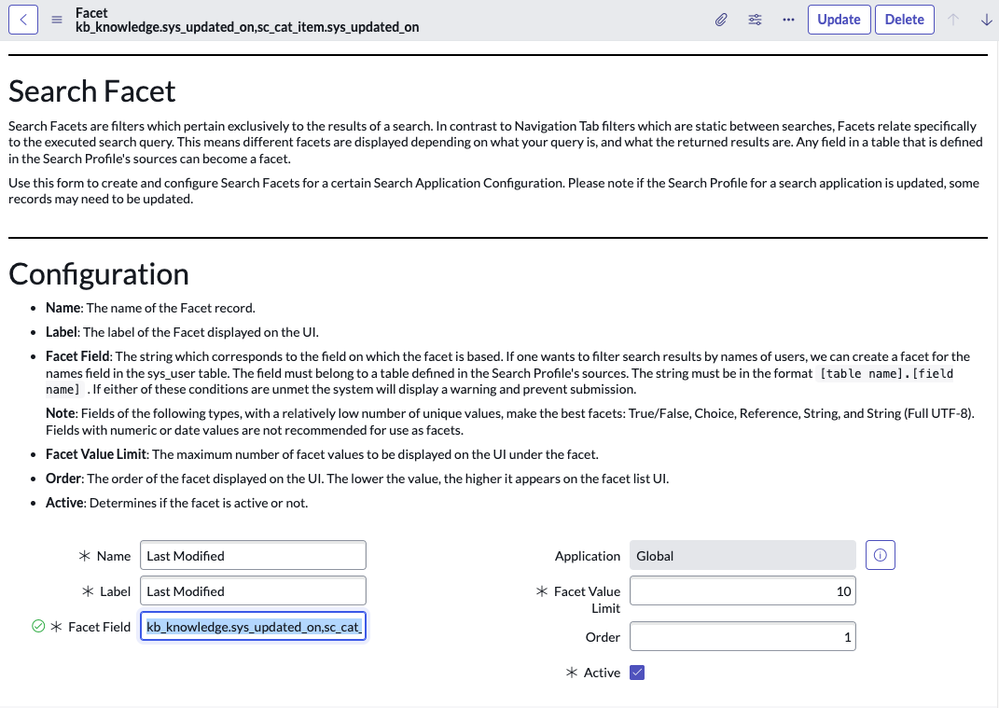
Below, is a quick example of how to configure a new facet that will demonstrate the creation of a cross table and range facet together.
- Navigate to AI Search > Search Applications > [Your AI Search application]
- On the Facets tab select New
- Set Name : Last Modified
- Label will automatically populate
- Set Facet Field : kb_knowledge.sys_updated_on,sc_cat_item.sys_updated_on (Note: the comma separated list of fields)
- Set Order : 1 (set this appropriately for your application)
- Save the configuration

To validate configuration navigate to the search application used in the configuration above and search for a term(s) that would be common across the two sources being used in the facet configuration.

View original source
https://www.servicenow.com/community/ai-intelligence-articles/quick-guide-to-cross-table-facets-and-range-facets/ta-p/2512842