
Transform Your Site with Engagement Messenger: Deliver Interactive Experiences.
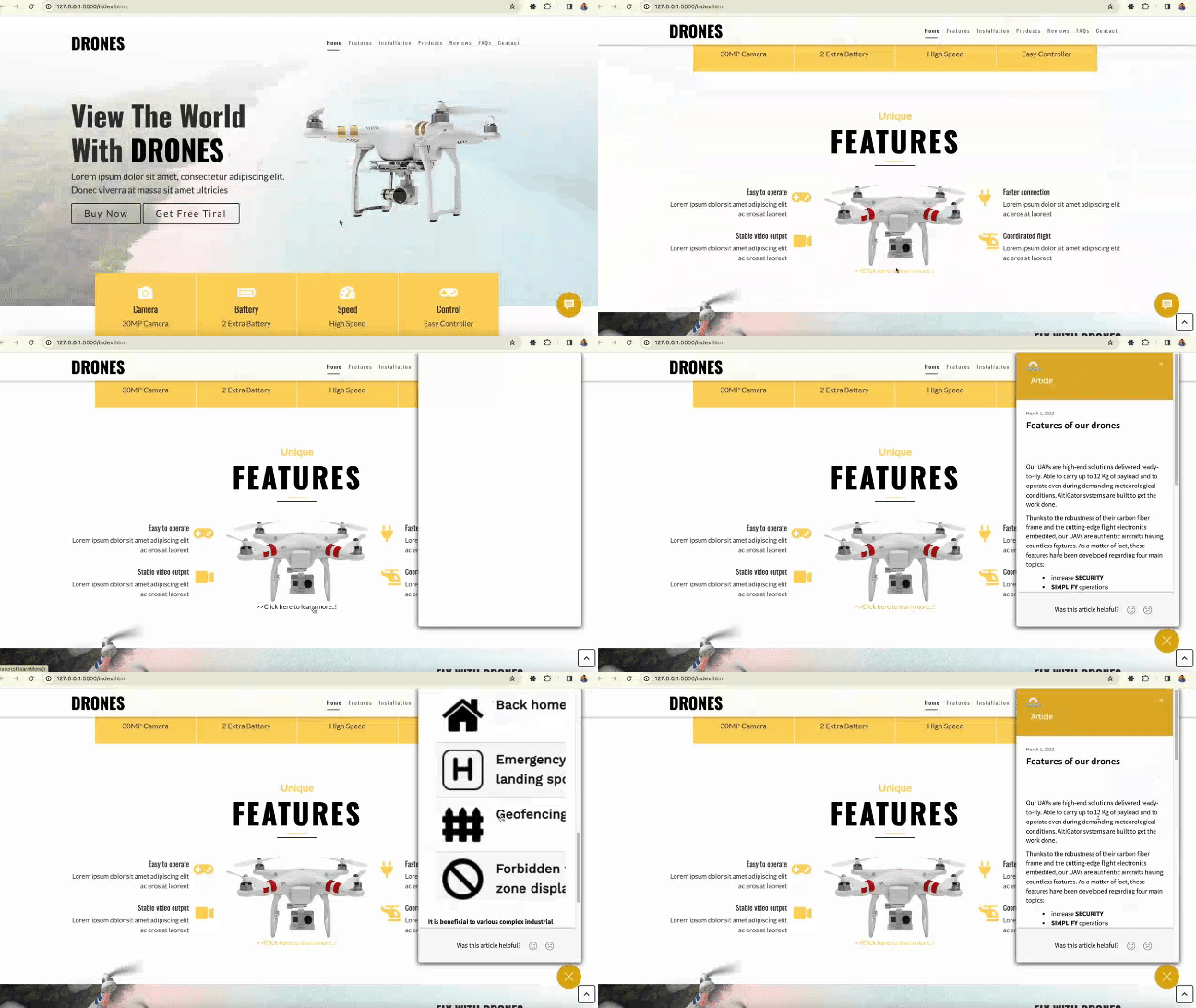
Transform your web presence with ServiceNow's Engagement Messenger and deliver the interactive experience your visitors desire.
ServiceNow's Engagement Messenger is a powerful tool that allows organizations to engage with their website visitors in a meaningful way. By embedding the engagement messenger with your organization's web applications such as site and portal, you can enable your visitors to get the information they need without having to navigate through multiple pages or forms.
The process of embedding the engagement messenger is straightforward, and ServiceNow provides comprehensive documentation on how to do it. (Refer Embed Engagement Messenger in your web application)Once it is done, you can start customizing your web pages to make them more interactive. You can, for example, populate service catalog request forms, KB articles, and connect live agents within the engagement messenger chatbot when a user clicks on a button or hyperlink.
- CATALOG_ITEM: When a user clicks on a button, it populates the service catalog request form directly, eliminating the need for the user to navigate to the form manually.
- Created "Free Trial" Catalog Item in ServiceNow and copied sys_id of the same.
- Defined the free_trl() function under section of 'DRONES' web site<br> <code> function free_trl(){ SN_CSM_EC.init({ moduleID: "https://your_instance_name.service-now.com/#5fde15ce1bc4f140270b2f40604bccbd", loadFeature: { feature: "CATALOG_ITEM", openOnLoad: true, params: { "sys_id": "e5958d731s51e450270b1f40604bcbd9" //paste the sys_id copied in above step. } } }); } </code><br></li> </ol> <p>- Calling the <u>free_trl()</u> function from "<strong>Get Free Trial</strong>" button-anchor tag of 'DRONES' web site<br><br> <code><br> <a class="btn" href="javascript&colon;free_trl()">Get Free Tiral</a> <br> </code><br> 2. <strong>VIEW_ARTICLE</strong>: When a user clicks on a hyperlink, it populates the KB article directly, eliminating the need for the user to navigate to the article manually.<br><br> <img src="https://www.servicenow.com/community/image/serverpage/image-id/314675i2B0E0733F0CE2D2D/image-size/large?v=v2&px=999" alt="view_article.gif"><br><br> - Created KB Article in ServiceNow and copied the <u><strong>sys_id</strong></u> of the same. </p> <p><img src="https://www.servicenow.com/community/image/serverpage/image-id/314695i0304DEF4A0582206/image-size/medium?v=v2&px=400" alt="Ratnakar7_1-1703059214902.png"><br><br> - Defined <u><strong>learnMore()</strong></u> function under <script> section of 'DRONES' web site.<br><br> <code><br> function learnMore(){ <br> SN_CSM_EC.init({ <br> moduleID: "https://your_instance_name.service-now.com/#4fae23ce1bc3f150270b2f40604bcbbf", <br> loadFeature: { <br> feature: "VIEW_ARTICLE", <br> openOnLoad: true, <br> params: { <br> "sys_kb_id": "1f2301c51fd1e553270b2d40604bcb62" //paste sys_id copied from above step. <br> } <br> } <br> }); <br> } <br> </code> </p> <p>- Calling <u><strong>learnMore()</strong></u> function from "<u><strong>Click here to learn more..!"</strong></u> hyperlink-anchor tag of 'DRONES' web site.<br><br> <code><br> <a href="javascript&colon;learnMore()"> >>Click here to learn more..! </a> <br> </code><br> 3. <strong>CHAT:</strong> When a user clicks on a button, it connects them to a live agent directly, eliminating the need for the user to navigate and find the respective live agent topic.<br><br> <img src="https://www.servicenow.com/community/image/serverpage/image-id/314714i67DB67703A70CC72/image-size/large?v=v2&px=999" alt="live-agent (1).gif"><br><br> - Created context variable to get <u>sysparm_queue</u> value to route the chat request to respective group.<br><br> <img src="https://www.servicenow.com/community/image/serverpage/image-id/314697iE9FAE37EE8B27056/image-size/medium?v=v2&px=400" alt="Ratnakar7_0-1703060308892.png"><br><br> - Created advance work assignment Queue with condition as context vaiable-queue is 'drone_support'<br><br> <img src="https://www.servicenow.com/community/image/serverpage/image-id/314699iE17662A4CD928067/image-size/medium?v=v2&px=400" alt="Ratnakar7_1-1703060526464.png"><br><br> - Copy the <strong><u>sys_id</u></strong> of existing live_agent support topic from <u>sys_cs_topic</u> table<br><br> <img src="https://www.servicenow.com/community/image/serverpage/image-id/314710i223726F27F175341/image-size/medium?v=v2&px=400" alt="Ratnakar7_2-1703063270915.png"> </p> <p>- Defined <strong><u>chatWithUs()</u></strong> function under <script> section of 'DRONES' web site.<br><br> <code><br> function chatWithUs(){ <br> SN_CSM_EC.init({ <br> moduleID: "https://your_instance_name.service-now.com/#3fde22ce1vc3f450230b2f40604bccvd", <br> loadFeature: { <br> feature: "CHAT", <br> openOnLoad: true, <br> params: { <br> "topic_id": "cs2de45004130010cf8cddeeff7b12dd", // paste the sys_id copied in above step <br> "sysparm_queue":"drone_support" //pass the value to context vairable to route the chat request. <br> } <br> } <br> }); <br> } <br> </code> </p> <p>- Calling <strong><u>chatWithUs()</u></strong> function from '<strong>Chat with US</strong>' button-anchor tag of 'DRONES web site.<br><br> <code><br> <a class="btn" href="javascript&colon;chatWithUs()">Chat with Us</a> <br> </code></p> <p>In conclusion, ServiceNow's Engagement Messenger is an excellent tool to improve your organization's web properties and provide your visitors with the interactive experience they crave. By leveraging its contextual launch supported features, you can customize the user experience and streamline the process of accessing the information they need.</p> <p>Labels: </p> <ul> <li><a href="https://www.servicenow.com/community/csm-articles/tkb-p/customer-service-management-kb/label-name/customer%20service%20management?labels=customer+service+management" target="_blank" rel="noopener">Customer Service Management</a></li> <li><a href="https://www.servicenow.com/community/csm-articles/tkb-p/customer-service-management-kb/label-name/engagement%20messenger?labels=engagement+messenger" target="_blank" rel="noopener">Engagement Messenger</a></li> </ul>
https://www.servicenow.com/community/csm-articles/transform-your-site-with-engagement-messenger-deliver/ta-p/2768487