
Configure Needs Attention attributes in Digital Portfolio Management (DPM)
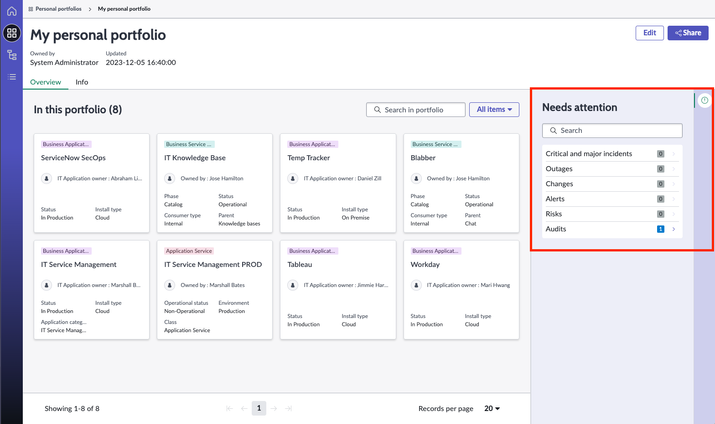
Starting in the Utah Digital Portfolio Management (DPM) version 4.2.4, the Needs attention content of DPM is configurable, allowing the admin to choose the types of records that users should be paying attention to. Examples include incidents, outages, and audits.

Admins access the customizations by selecting All > Needs Attention > Needs Attention Attributes. Below is a list of the fields in the table and instructions on what values should be used.
Table: dpm_needs_attention_attribute
| Attribute display name | Description |
|---|---|
| Critical and major incidents | P1, P2 and accepted Major incidents created in the last day. Other query conditions may be applied automatically, for example, the conditions connecting the parent/child relationships of items. |
| Outages | Planned outages, unplanned outages, or degradations created in the last day. Other query conditions may be applied automatically, for example, the conditions connecting the parent/child relationships of items. |
| Changes | High risk or Emergency changes created or closed (but not cancelled) in the last day. Other query conditions may be applied automatically, for example, the conditions connecting the parent/child relationships of items. |
| Alerts | Critical [does not include Major] alerts created in the last day. Other query conditions may be applied automatically, for example, the conditions connecting the parent/child relationships of items. |
| Risks | Hardware models and software products that are nearing end of life in more than three weeks but less than one month. Other query conditions may be applied automatically, for example, the conditions connecting the parent/child relationships of items. |
| Audits | Open Follow-on tasks related to one of six Audits relating to Business Applications. Other query conditions may be applied automatically, for example, the conditions connecting the parent/child relationships of items. |
Each Needs attention attribute contains the following fields.
| Field | Description |
|---|---|
| Script | Generates an array of Needs attention objects. Each one is displayed as a card on the homepage and in the Needs attention sidebar. For details, see Writing the Script field below. |
| Solution type | A drop-down field to apply each attribute to one or more solution types. The solution types options are: Services and offerings Business applications Application services |
| UX list | A searchable field to assign what the count that the user sees while viewing the Needs attention cards on the homepage. For example, for a service, the number of incidents is displayed. The user can click on the count to see the list of records that make up the count. The UX list field is the UX list [sys_ux_list] record that customizes the list view for that table. |
| Active / Show on homepage / Show on Needs attention | If any of these items are set to false (unchecked), then the Needs attention attribute will not show up on the DPM homepage or in the Needs attention sidebar or the preview page. When the Active item is checked, its placement can be further customized to show on the homepage and/or show in the Needs attention sections of the preview page and the details page sidebar. |
| User personalization defaultsWhen a user adds a solution to their homepage display, default values are applied, but can be personalized by the user. | |
| Field | Description |
| Thresholds | On the DPM Workspace homepage, solutions (services or business applications) are displayed as cards. Each card displays up to four Needs attention attributes with the following threshold levels: Good: If the count for an attribute is less than the moderate threshold, then that attribute has a good (green check) status. Moderate: If the attribute is equal to or greater than the moderate status, but less than the sever status, then that attribute has a cautionary (orange circle) status. Severe: If the count is equal to or greater than the severe status, then that attribute has a severe (red triangle) status. Solution card status: If any attribute is a severe status, then the solution card is marked red. If any attribute is a moderate status (and none are severe), then the solution card is marked orange. If any attribute is a good status, then the solution card is marked green. Notes: The cards are sorted by severity and the most severe cards are shown first. The table ships with default threshold values for each solution that users add to their homepage. DPM admins (sn_dpm.dpm_admin) can edit the default threshold values. Users can personalize these threshold values by selecting Personalize > Edit status conditions. The edits apply to the user's DPM homepage. Once personalized, the default threshold values won't display again for the logged in user. |
| Order | Each solution card can have up to four attributes, shown in order by the Order field. The Order field provides the default value when solutions are added to a user’s homepage. Users can personalize the order values per solution. |
Writing the Script field
The Script field generates an array of objects containing the data needed for the Needs attention cards for the homepage and Needs attention sections of the details and preview pages.
Inputs
grAttrib: a GlideRecord of the current Needs Attention Attribute record
[dpm_deeds_attention_attribute]
grSolution: a GlideRecord of the solution that the attribute is being applies to.
Examples include service_offering, cmdb_ci_service, dpm_personal_portfolio
Outputs
A JavaScript array of Objects containing details about solution. Below is an example from a query on the Incident table. Fields will vary depending on the fields of the solution table.
[
{
createdOn: "2023-01-05 20:00:05"
details: [
number: INC0010001
shortDescription: "On-call support offering is not functioning as intended."
sysId: "2c59285047d429101aeacc48946d43f2"
table: "incident"
type: "P2 - High"
]
}
]
DPM ships with the following attributes. For the plugin column marked "none," those plugins come standard with DPM.
| Needs attention attribute | Plugin required |
|---|---|
| Critical incidents (or P1 and P2 and major incidents, if MIM is installed) | Major Incident Management [com.snc.incident.mim] |
| Outages | none |
| Changes (Emergency and/or high-risk changes) | none |
| Alerts (Severity 1 alerts, if Event Management is installed) | Event Management [com.glideapp.itom.snac] |
| Risks (Technology Portfolio Management, end of support risks, if APMis installed) | Application Portfolio Management [com.snc.apm] Software Asset Management Foundation [com.snc.sams] Technology Portfolio Management [sn_apm_tpm |
| Audits | none |
The script_include DPMNeedsAttentionUtilsSNC and contains most of the logic for the Needs Attention attributes. In parity with the out-of-box attribute records shipped with DPM, the script exposes the following methods:
getIncidentsNA (grAttrib, grSolution, query)
getOutagesNA (grAttrib, grSolution, query)
getChangesNA (grAttrib, grSolution, query)
getAuditsNA (grAttrib, grSolution, query)
getAlertsNA (grAttrib, grSolution, query)
getRisksNA (grAttrib, grSolution, query)
These methods do the heavy lifting for the Script fields in the records. Each noted takes three params:
- grAttrib: a GlideRecord of the current Needs Attention Attribute record [dpm_deeds_attention_attribute].
- grSolution: a GlideRecord of the solution that the attribute is being applies to. Examples include service_offering, cmdb_ci_service, dpm_personal_portfolio.
- query: additional query string applied to the solution table. There are other queries applied automatically, like those that establish the relationships between offerings and their parent services or portfolios/nodes and children. These queries are intended to limit the range of your needs attention results. Examples would include state, severity, priority, type or date range.
For more information, see Scripting Technical Best Practices.
Customizations
**Important! Any customizations that you make changes the code. The result is that your customizations will override future upgrades to DPM.**
Make simple customizations to Needs attention records in the records themselves. You can:
- Hide irrelevant attributes with the Active and Show properties.
- Make simple changes to the queries in the query strings themselves. Examples:
- Limit Incidents to P1 (instead of OOB P1 and P2).
- Adjust date ranges to cover the last three days instead of yesterday only.
- Limit Incidents to P1 (instead of OOB P1 and P2).
More complex customizations would include adding attributes for solution tables not covered out-of-the-box. If you need to extend the Needs attention library and write attributes covering additional solution tables, then it's suggested that you write your code in the attribute records, and if it makes sense, extend the DPMNeedsAttentionUtilsSNC library through an extension point.

https://www.servicenow.com/community/itsm-articles/configure-needs-attention-attributes-in-digital-portfolio/ta-p/2764669