
Check if Table Cleaner is working well
Import
·
Nov 14, 2023
·
article
- You are an admin
- You want to understand if Table Cleaner is working well and if something might be stuck
What is Table Cleaner?
How to debug Table Cleaner?
- Sadfuly OOB logs are not very easy to read. You can :
- Look sys_auto_flush table for definitions
- Look sys_auto_flush_run table for duration of last runs, and when it runned last time
- Look syslog for duration of last runs, and when it runned last time
- Look transactions logs to check if Table Cleaner runned, when, and for how long
- Look sys_trigger to see if the job is running or nor
- Look sys_auto_flush table for definitions
- My tool in allows to do the same, but in an easy way
How to use the Tool
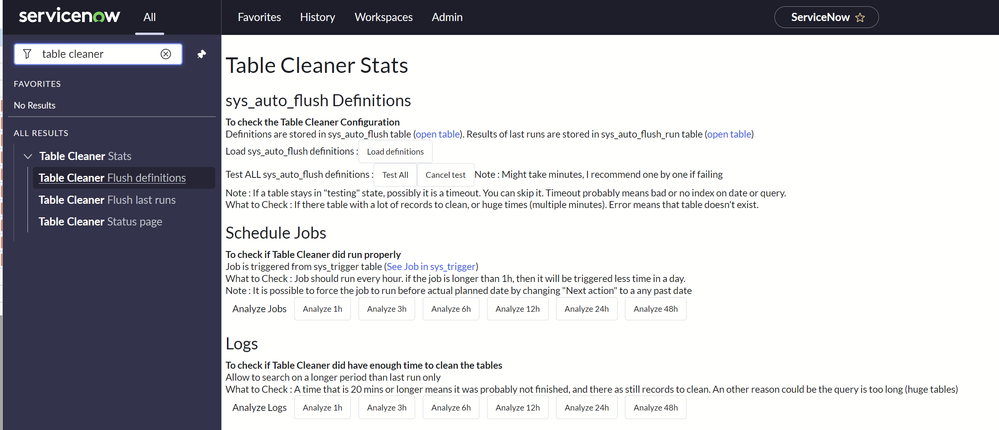
- I created a menu to access the UI page :

Example part 1 : sys_auto_flush Definitions
- To check the Table Cleaner Configuration

- On this example you can see :
- cmdb_metric : Definition is configured to delete data in a table that doesn't exist (it will be ignored)
- All defincitions : Query time seems OK
- em_impact_graph : Cleanup of this table is possibly late (please note it can be normal as the job runs every hour only)
- cmdb_metric : Definition is configured to delete data in a table that doesn't exist (it will be ignored)
Example part 2 : Schedule Jobs
- To check if Table Cleaner did run properly
- Example 1 : All is very fast

- Example 2 : OK, but long :

- Example 3 : Job took a long time to run, it is not normal
- Job will be late, impact on performance may occur

Example part 3 : Tables taking a lot of time to clean, from Logs
- To check if Table Cleaner did have enough time to clean the tables
- On the following example, we can see em_impact_graph is very long to process :

How to deploy
- As an admin, download and install the attached Update Set on your instance :
- Download
- Navigate to .
- Click the Import Update Set from XML link
- Select the downloaded file and Upload
- Open the Update Set
- Click Preview Update Set
- Click Commit Update Set
- Reload the menus, it is possible that you have to relog to see it
- Download
Example of typical findings you might spot
- Issue : Table Cleaner rule that is querying an index attribute
- Possible solutions : change indexes, change query, reduce time window to clean, find alternative ways to clean, remove auditing (removed data can be saved, slowing a lot the process)
- Issue : Table clean definition table or query is wrong
- Issue : A defintion is not cleaning as an other is taking all the time

View original source
https://www.servicenow.com/community/now-platform-articles/check-if-table-cleaner-is-working-well/ta-p/2731850