
Function Fields in ServiceNow Reports: Calculate and Display Data on the Fly
Introduction:
Function fields are a powerful feature in ServiceNow reports that allow you to calculate and display data on the fly, but this is under used feature because of lack of awareness. This can be useful for Performing calculations on existing fields.
Function fields are not stored in the database, but are instead calculated on the fly when the report is run. This makes them very efficient and flexible.
Creating a Function Field:
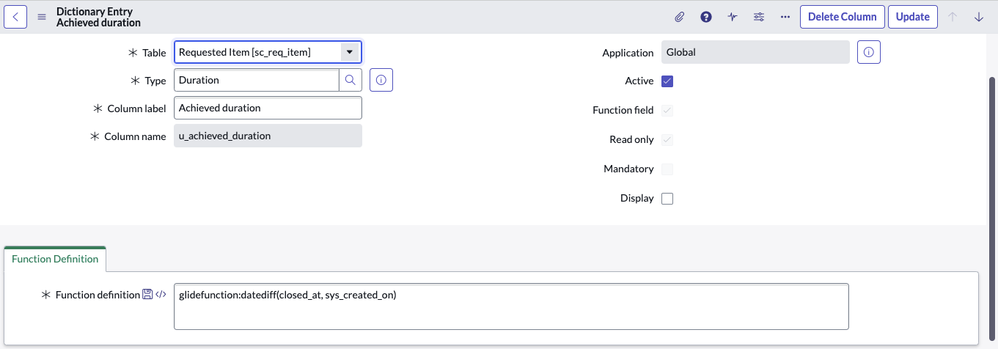
To create a function field, navigate to All > System Definition > Dictionary and click New. Select the Function field and fill in the following fields:
- Name: The name of the function field.
- Table: The table that the function field will be associated with.
- Function definition: The formula that will be used to calculate the function field value.

The formula can include any valid ServiceNow function, for all the available functions refer the documentation here.
Example:
The following function field calculates the duration between closed time and created time of an RITM:
Formula: glidefunction:datediff(closed_at, sys_created_on)
This function field could be used to create a report that shows the average number of days to fulfill service requests.
Using Function Fields in Reports:
Once you have created a function field, you can use it in reports just like any other field. To do this, simply drag the function field from the Report Fields pane to the report.
You can also use function fields in filters, breakdowns, and other report elements.
Benefits of Using Function Fields:
There are a number of benefits to using function fields in ServiceNow reports:
- Flexibility: Function fields allow you to calculate and display data in any way you need.
- Efficiency: Function fields are calculated on the fly, so they do not impact the performance of your reports.
- Scalability: Function fields can be used to create complex and sophisticated reports without having to modify the underlying database schema.
Conclusion:
Function fields are a powerful and versatile tool that can be used to enhance the capabilities of ServiceNow reports.
Tips for Using Function Fields
Here are a few tips for using function fields in ServiceNow reports:
- Use parentheses to group formula elements. This will help to ensure that the formula is evaluated correctly.
- Test your formulas thoroughly before using them in production reports. You can use the Report Preview feature to test your formulas and make sure that they are working as expected.
- Be aware of the performance implications of complex function fields. If you are using a complex function field in a high-traffic report, you may want to consider using a calculated field instead.
https://www.servicenow.com/community/developer-articles/function-fields-in-servicenow-reports-calculate-and-display-data/ta-p/2723044