
ServiceNow Customize Reference Field Pop Up
less than 1 minute read
Adding new reference fields to the pop up view is something that comes up from time and is a much easier that you might expect to configre. A simple form layout!
- Go to the sys_user table and open a record
- Configure -> Form Layout
- Under View New name, create a new view “sys_popup”
- Add/Remove the fields you want from this view
Now when you go to record the caller reference will contain different view than the default.
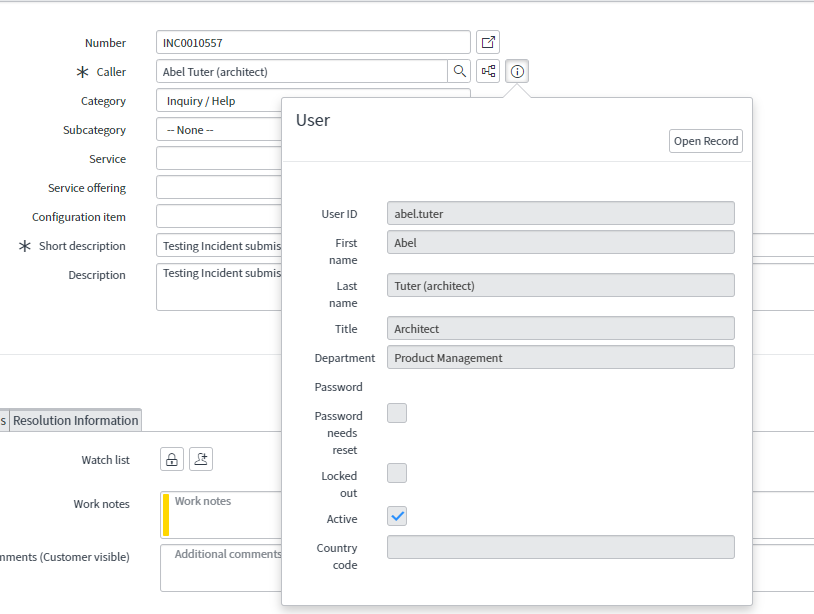
Also see this community post!
How to customize fields displayed on the reference field pop up form using a sys_popup view.
Updated: July 10, 2021
Leave a comment
3 minute read
2 minute read
Summary Grafana is both a log/metric visualization tool and an alerting tool. It can be configured to send its alert data to ServiceNow Event Management, inc...
1 minute read
Summary For anyone interested in ServiceNow ITOM, there’s no better way to learn than on your own infrastructure that you can tear down and rebuild as needed...
1 minute read
Summary Ansible has a built-in collection that allows you to connect to a ServiceNow instance and do things like: Create or Update an Incident/Change/Prob...
https://mtcoffee.github.io/servicenow-customize-reference-field-pop-up/