
Modify Virtual Agent Dashboard in UI Builder
Import
·
Sep 21, 2023
·
article
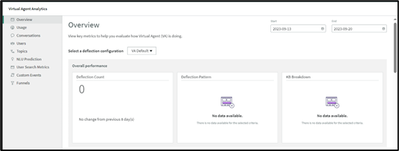
In my Virtual Agent Analytics Dashboard the first three reports in Overview were showing blank because none were used in Topics
so no data was showing in them. So had to remove them and Add one report so everything could be seen in a single dashboard.

From the top right corner, click on Edit page.

It will open in a New window. Locate the Page/variant you want to edit and go to Settings.

Duplicate the Variant

Remove the Container that has empty reports.

Select the Data visualization if you want to have report and configure parameters as per requirement.


Save the Dashboard once ready.

View original source
https://www.servicenow.com/community/developer-articles/modify-virtual-agent-dashboard-in-ui-builder/ta-p/2678197