
Customize Slush bucket in ServiceNow
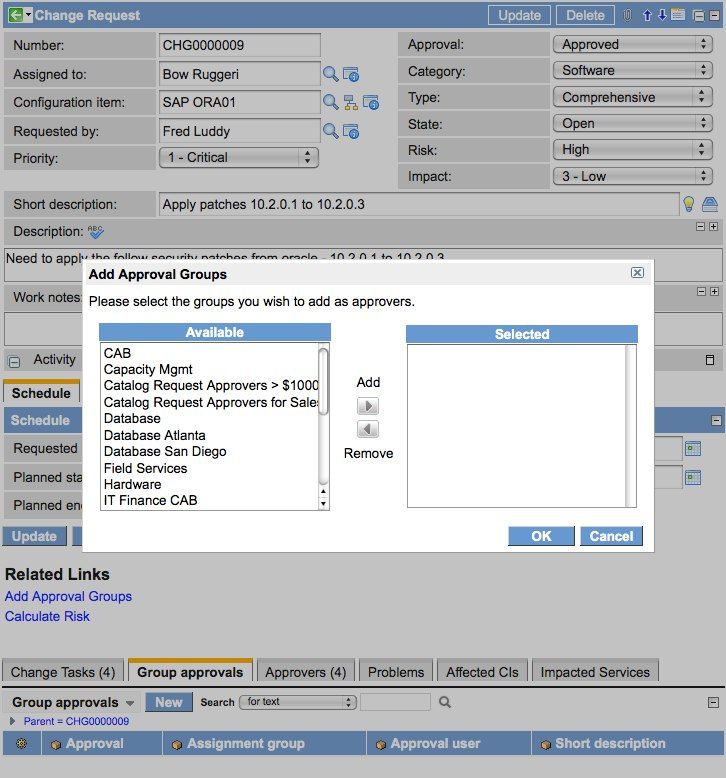
This article shows how to create customize slush bucket of any table and provide a better UI by creating a slushbucket popup dialog that allows users to select one or many groups. Selected Group and incident we stored on another table so that we can use anywhere as per our requirement.

We Need to create UI action. By clicking on this button our customize slush bucket will open
Name: Notice Group
Client: true
Form link: true
OnClick: addNoticeGroups()
Script:
| function addNoticeGroups(){ var dialog = new GlideDialogWindow('add_notice_groups'); dialog.setTitle('Add Groups Notice'); dialog.setPreference('sysparm_groupQuery', 'active=true'); dialog.setSize(600,900); dialog.render(); return false; } |
|---|
UI Page -add_notice_groups
HTML of UI Page
<?xml version="1.0" encoding="utf-8" ?>
|
|---|
Client Script of UI Page
| //Called when the 'OK' button gets clicked function continueOK(){ //Get the selected values from the right slushbucket var values = slush.getValues(slush.getRightSelect()); //Get the sys_id of the current record var taskID = g_form.getUniqueValue(); //Make sure we have at least one selection if(values == ''){ alert("At least one group must be selected"); return; } //Add the group approval records var ajax = new GlideAjax('GroupSelectAjax'); ajax.addParam('sysparm_name', 'groupsAdd'); ajax.addParam('sysparm_taskID', taskID); ajax.addParam('sysparm_values', values); ajax.getXML(addGroupResponse); } //Called when we get a response from the 'continueOK' function function addGroupResponse(){ GlideDialogWindow.get().destroy(); GlideList2.get('').setFilterAndRefresh(''); return false; } //Called when the 'Cancel' button gets clicked function continueCancel(){ //Close the dialog window GlideDialogWindow.get().destroy(); return false; } //Called when the form loads addLoadEvent(function(){ //Load the groups when the form loads slush.clear(); var ajax = new GlideAjax('GroupSelectAjax'); ajax.addParam('sysparm_name', 'getGroups'); ajax.getXML(loadResponse); return false; }); //Called when we get a response from the 'addLoadEvent' function function loadResponse(response){ //Process the return XML document and add groups to the left select var xml = response.responseXML; var e = xml.documentElement; var items = xml.getElementsByTagName("item"); if(items.length == 0) return; //Loop through item elements and add each item to left slushbucket for (var i = 0; i < items.length; i++) { var item = items[i]; slush.addLeftChoice(item.getAttribute('value'), item.getAttribute('text')); } } |
|---|
GroupSelectAjax Script include in which add selected group and incident will store in new table and then we will use it
| var GroupSelectAjax = Class.create(); GroupSelectAjax.prototype = Object.extendsObject(AbstractAjaxProcessor, { //Get and return a list of groups (name and sys_id) getGroups: function() { var gr = new GlideRecord("sys_user_group"); gr.orderBy('name'); gr.addQuery('active', true); gr.query(); //Add the available groups to select from while (gr.next()) { var item = this.newItem(); item.setAttribute('value', gr.getValue('sys_id')); item.setAttribute('text', gr.getValue('name')); } }, //Take a taskID and group sys_id values and add 'sysapproval_group' records groupsAdd: function() { var taskID = this.getParameter('sysparm_taskID'); var values = this.getParameter('sysparm_values').split(','); //Iterate through the group sys_id values for(x in values){ var rec = new GlideRecord('u_group_notice'); rec.initialize(); rec.u_task_of_type = taskID; rec.u_group_list_of_type = values[x]; rec.insert(); } } }); |
|---|
Please try this, Hope it will help you.
Happy Learning!!!!
https://www.servicenow.com/community/developer-articles/customize-slush-bucket-in-servicenow/ta-p/2674516