
Required configuration to add a bottom-level lens structure for a data separation enabled lens
Required configuration to add a bottom-level lens structure for a data separation enabled lens
This article provides the required data separation configuration for adding a lens structure for the lens on which data separation is enabled.
Note: This configuration is applicable only if you are creating a bottom-level lens structure for the lens on which data separation is enabled.
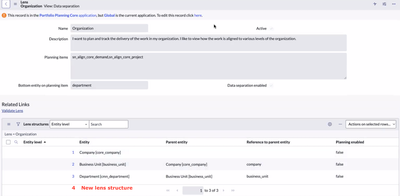
- Add a bottom level lens structure in the required lens. For instructions on how to add a lens structure, see documentation.

Note: Make sure that the planning item(sn_align_core_planning_item), project (pm_project) and demand (dmn_demand) tables have a field referencing to the entity that is populated on the lens structure you have created.
- Make sure that the “Bottom entity on planning item” field on the lens record is populated with the field on planning item(sn_align_core_planning_item) table referring to the entity populated on the lens structure you have created.
- Navigate to System Definition -> Script Includes and search and open the “DSLensLeafEntityMapping” record.
- Add the key-values as required for both “pm_project” and “dmn_demand” keys in the “DSLensLeafEntityMapping.LEAF_LENS_ENTITY_MAP” constant.
For the “pm_project” key of DSLensLeafEntityMapping.LEAF_LENS_ENTITY_MAP, add a key-value pair.
- Key = Name of the field on planning item(sn_align_core_planning_item) table referring to the entity in the newly added lens structure.
- Value = Name of the field on project(pm_project) table referring to the entity in newly added lens structure.
For the “dmn_demand” key of DSLensLeafEntityMapping.LEAF_LENS_ENTITY_MAP, add a key-value pair.
- Key = Name of the field on planning item(sn_align_core_planning_item) table referring to the entity in the newly added lens structure.
- Value = Name of the field on demand(dmn_demand) table referring to the entity in newly added lens structure
- Save the changes made to the script include.
- Add the entity-group mappings in the “Entity-Group Mappings” table with lens entity table as the entity in the bottom-level lens structure and click “Sync data separation” on the Entity-Group mappings list view.
Example:
For a new lens structure with entity as “pm_program” the DSLensLeafEntityMapping.LEAF_LENS_ENTITY_MAP constant must be updated as follows.
- Under the “pm_project” key (If “u_program” and “top_program” are the fields on planning item(sn_align_core_planning_item) and project(pm_project) tables respectively referring to pm_program table, then key value pair will be “u_program”: “top_program”)
- Similarly, under the “dmn_demand” key (If “u_program” and “primary_program” are the fields on planning item(sn_align_core_planning_item) and demand(dmn_demand) tables respectively referring to pm_program table, then key value pair will be “u_program”: “primary_program”)

- Add the entity-group mappings in the “Entity-Group Mappings” table with lens entity table as “pm_program” and click “Sync data separation” on the Entity-Group mappings list view.
https://www.servicenow.com/community/spm-articles/required-configuration-to-add-a-bottom-level-lens-structure-for/ta-p/2611183