
ITSM Impacted Services - sample execution & overall considerations
Introduction
If you do not have prior knowledge about Application Service data structure, I firstly recommend spending some time on the Application Service specifics. Especially, it is important to acknowledge the flat data structure called CI associations [svc_ci_assoc]. For example, my colleague @davidskowronek has written a very good article - Application Services: How to use them? - talking about these CI Associations as well as other aspects of Application Services. I also recommend reviewing Application Services on product docs with thought. And explore directly in the platform!
In this article, I'll:
- provide an overview of the ITSM Impacted Services execution focusing on incident management
- describe ITSM Impacted Services execution logic consuming CI Association data
- illustrate how CSDM-aligned data can be consumed by the Impacted Services feature
- showcase a workaround to populate the Service Offerings related list using CI relationships (yes - this is not the case out-of-box unfortunately)
Though I am focusing on incident management, the described logic and options are similar for change management. The primary difference between incident and change management is dedicated system properties to control the logic. These properties are "process internal". In other words, the incident specific Impacted Services system properties do not affect change management and vice versa. Therefore, if you are not careful, you may end up having different Impacted Services output per process while the underlying data would be the same.
This article is written against the Utah release.
Incident Management & Impacted Services settings
The system properties are officially documented on product docs: Refresh impacted services and CIs for incident. For my illustrative sample scenario, I have the following system property values:
| Property | Value | Notes |
|---|---|---|
| com.snc.incident.refresh_impacted.include_affected_cis | true | Impacted Services/CIs [task_cmdb_ci_service] related list is populated based on Affected CIs [task_ci] related list data. Affected CIs are used to query associated Application Services from the CI association [svc_ci_assoc] table. Any found Application Services are then populated into the Impacted Services/CIs list. |
| com.snc.incident.refresh_impacted.event | true | I mpacted Services data is populated asynchronously for better user experience. |
| com.snc.incident.populate_business_application | true | Upstream business applications are populated on a dedicated related list [task_cmdb_ci_business_app]. |
| com.snc.incident.populate_service_offering | true | Upstream service offerings are populated on a dedicated related list [task_service_offering]. |
Impacted Services - sample data & execution
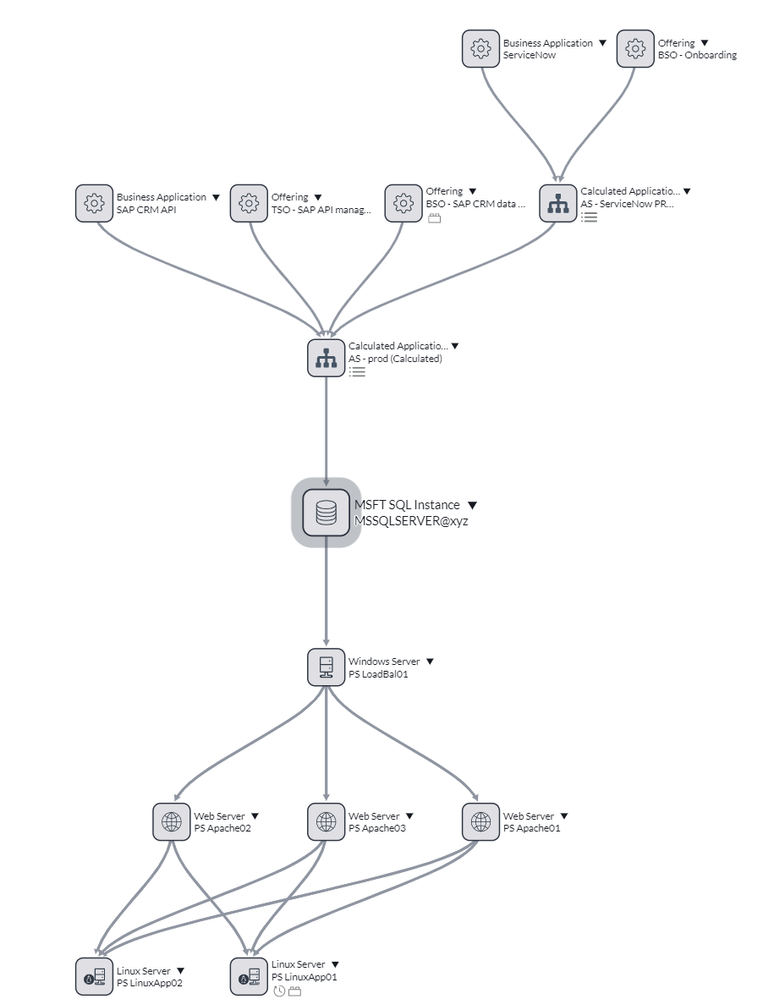
My sample CMDB data involves:
- Application Services and their downstream CIs
- Upstream business applications and service offerings
Though the data is purely illustrative, it can be deemed CSDM aligned.

The involved Application Services are Calculated Application Services [cmdb_ci_service_calculated]. For these Application Services, the platform automatically syncs CI relationship changes into the CI association table discussed earlier. Firstly, this ensures data availability for the Impacted Services logic with the described system property values. Secondly, this reduces manual efforts around Application Service data when ITOM Service Mapping is not involved.
From the viewpoint of MSSQLSERVER@xyz, my CI Association data is as follows:

- AS - prod (Calculated) is the only Application Service associated with the configuration item MSSQLSERVER@xyz
So, let's create an incident where the highlighted MSSQLSERVER@xyz is selected as the Configuration item. We will end up with the following data in our related lists:
| List | Data |
|---|---|
| Affected CIs | MSSQLSERVER@xyz |
| Impacted Services/CIs | AS - prod (Calculated) |
| Service Offerings | |
| Business Applications | SAP CRM API |
Incident Impacted Services - technical process flow
As we saw from the above sample output, the Impacted Services logic did not consume CSDM-aligned relationships to populate the Service Offerings related list. The below diagram describes the high-level execution sequence that took place when Impacted Services logic was initiated against my sample incident:

As seen from the above illustration, the Service Offerings list is populated by executing a query against the [service_offering] table itself. Out-of-box, this query expects Impacted Services/CIs list to have service data - business or technical service data - which is parent to one or more service offerings.
So, the question is: How to consume CI relationships for Service Offerings list population? I'll provide a sample workaround in the next section of this article.
Impacted Services - altering the Service Offerings list population
In order to have the Service Offerings related list population to consume CI relationships, you need to override the baseline behavior by updating the TaskOffering script include:
var TaskOffering = Class.create();
TaskOffering.prototype = Object.extendsObject(TaskOfferingSNC, {

    initialize: function() {
        TaskOfferingSNC.prototype.initialize.call(this);
    },

    /**
    * Creates an array of Service Offering sys_id's based on an array of CI sys_id's using CI relationships.
    *
    * @param {array} configurationItems - an array of CI sys_id's ("cmdb_ci_service" field values from the [task_cmdb_ci_service] table)
    *
    * @return {array} - an array of found Service Offering sys_id's
    */
    getOfferings: function(configurationItems) {
        var serviceOfferings = [];

        if (configurationItems) {
            /*
            Add your desired query against [cmdb_rel_ci] here. For example, query records where
            the parent CI class is service_offering and child CI is one of the sys_id's in the 'configurationItems' parameter.
            Then, push the queried service_offering sys_id's into the 'serviceOfferings' array.
            Ci Relationship table often contains a lot of records. Consider limiting your query to retrieve only a reasonable amount of records.
            */

        }
        return serviceOfferings;
    },

    type: 'TaskOffering'
});
The script include is empty out-of-box and is meant for customers to override baseline functionality as needed. Configuring the getOfferings method as described above will override the baseline method in the script include TaskOfferingSNC. Additionally, this config change will apply to both incident and change management Impacted Services execution. The primary script components are shared though process-specific system properties are available as I noted earlier.
Key takeaways & call to action
- Platform data (models) and config should be planned & designed in conjunction to avoid discrepancies
- Leveraging ServiceNow product-specific expertise helps ensure your implementation aligns with your specific data models
- ServiceNow CMDB is more than the individual CIs and their relationships expanding to Application Service related data structures
- Trial your CMDB data-driven use cases prior to production use
- We always aim to be better here at Servicenow - please join me in voting this idea to enhance the ITSM Impacted Services feature!
@barrykant - big thanks for the many inspirational CSDM discussions that may sometimes result in a community article!
@davidskowronek - a very warm thank you for always sharing your insights & expertise!
https://www.servicenow.com/community/common-service-data-model/itsm-impacted-services-sample-execution-amp-overall/ta-p/2571257