
Removing the top left logo tooltip on Employee Center (without editing the Header widget)
 Mark Roethof
Articles, Blogs, Videos, Podcasts, Share projects - Experiences from the field
Hi there,
Ever encountered working with Employee Center, hovering over the de top left logo, and a really annoying tooltip popup that prevents you from clicking the first one or two menu items? Sure you have  Let's get rid of this tooltip!
A small article this time, sharing a method with which you can remove the tooltip AND leave the Header widget untouched.
Tooltip
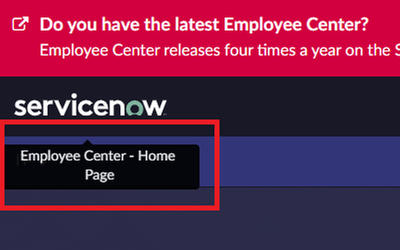
The tooltip what this article is for. When hovering over the top left logo in Employee Center, a tooltip "Employee Center - Home Page" will pop up. The tooltip will overlay the first one or two menu items which makes clicking these immediately impossible.

CSS override
You could remove the tooltip by editing the "Employee Center Header" widget. Though when you edit this widget, you own it and on future updates from ServiceNow you will be facing Skipped Updates regarding the widget. And as a bonus... when updating the widget, this will also result in a cross scope access privilege error message which you will need to handle.
For small visual changes like removing the tooltip, my preference is to look into overriding CSS. In this case creating CSS Include and Stylesheet which we can associate to the "EC Theme" which is the Theme record associated with the "Employee Center" portal record.


In most cases you could use the browser inspector to inspect which CSS elements you are after influencing. Unfortunately, in this case that will be a lot toucher. I will shorter your search by just sharing the CSS code I've used for this. It's a combination of several elements and wildcards.

a[data-title*="Employee Center"][data-toggle*="tooltip"][href*="?id=ec_dashboard"] ~ div[class*="tooltip fade bottom in"] {
  display: none !important;
}
Note: For Employee Center Pro the code might slightly differ!
Result
After applying the CSS Include and Stylesheet with above code, when hovering over the top left logo, the tooltip should not pop up anymore.

---
And that's it. Hope you like it. If any questions or remarks, let me know!
Kind regards,
Mark Roethof
Independent ServiceNow Consultant
4x ServiceNow Developer MVP
4x ServiceNow Community MVP
---
https://www.servicenow.com/community/employee-center-articles/removing-the-top-left-logo-tooltip-on-employee-center-without/ta-p/2574985