
How to migrate and deploy trained Document Intelligence Use Cases
Import
·
Apr 18, 2023
·
article
To migrate and deploy a trained Docintel Use Case perform the following steps in Utah and Previous versions:
- Exporting a use case to an update set:
- Navigate to System Definition > Scripts – Background
- Copy the following code:
var TASK_DEFINITION_TO_EXPORT_SYS_ID = ""; var APPLICATION_SYS_ID = ""; // This is set at the beginning of the exportTaskDefinition // to match the sys_scope of the task definition var EXPORT_TASKS = true; var TASK_BATCH_SIZE = 50; var scopeToUpdateSet = {}; var taskDefinitionName = ""; function getTaskSuffix(taskBatchNum) { if (taskBatchNum != null) { return ( " task " + ((taskBatchNum - 1) * TASK_BATCH_SIZE + 1) + "-" + taskBatchNum * TASK_BATCH_SIZE ); } else { return ""; } } function createUpdateSet(taskBatchNum) { var taskSuffix = getTaskSuffix(taskBatchNum); var globalNameSuffix = " global update set" + taskSuffix; var globalKey = "global" + taskSuffix; // Create a new global update set var globalUpdateSetGR = new GlideRecord("sys_update_set"); globalUpdateSetGR.initialize(); globalUpdateSetGR.name = taskDefinitionName + globalNameSuffix; globalUpdateSetGR.application = "global"; var globalUpdateSetID = globalUpdateSetGR.insert(); scopeToUpdateSet[globalKey] = globalUpdateSetID; // Create a new APPLICATION_SYS_ID scope update set only if task definition doesn't belong to global scope if(APPLICATION_SYS_ID === "global") { return; } var appNameSuffix = " " + getApplicationScope(APPLICATION_SYS_ID) + " update set" + taskSuffix; var appKey = APPLICATION_SYS_ID + taskSuffix; var updateSetGR = new GlideRecord("sys_update_set"); updateSetGR.initialize(); updateSetGR.name = taskDefinitionName + appNameSuffix; updateSetGR.application = APPLICATION_SYS_ID updateSetGR.parent = globalUpdateSetGR.sys_id; var updateSetID = updateSetGR.insert(); scopeToUpdateSet[appKey] = updateSetID; } function getApplicationScope(appId) { var appGr = new GlideRecord("sys_scope"); if(appGr.get(appId)) { return appGr.getValue("name"); } return ""; } function saveToUpdateSet(glideRecord, taskCount) { var gum; var scope = String(glideRecord.sys_scope || "global"); if (scope !== "global" && scope !== APPLICATION_SYS_ID) { gs.info("unknown scope: " + scope + "|" + glideRecord.getDisplayValue()); return; } var taskBatchNum = taskCount ? Math.ceil(taskCount / TASK_BATCH_SIZE) : null; var updateSetSysId = scopeToUpdateSet[scope + getTaskSuffix(taskBatchNum)]; if (!updateSetSysId) { createUpdateSet(taskBatchNum); updateSetSysId = scopeToUpdateSet[scope + getTaskSuffix(taskBatchNum)]; } try { gum = new GlideUpdateManager2(updateSetSysId); } catch (e) { var gus = new GlideUpdateSet(); gus.set(updateSetSysId); gum = new GlideUpdateManager2(); } gum.saveRecord(glideRecord); } function exportTasks(taskDefinitionId) { var taskCount = 0; var taskGR = new GlideRecord("di_task"); taskGR.addQuery("task_definition", taskDefinitionId); taskGR.query(); while (taskGR.next()) { taskCount += 1; saveToUpdateSet(taskGR, taskCount); // PDFs var pdfGR = new GlideRecord("di_pdf"); pdfGR.addQuery("task", taskGR.sys_id); pdfGR.query(); while (pdfGR.next()) { saveToUpdateSet(pdfGR, taskCount); // PDF Inputs var pdfInputGR = new GlideRecord("di_pdf_input"); pdfInputGR.addQuery("pdf", pdfGR.sys_id); pdfInputGR.query(); while (pdfInputGR.next()) { saveToUpdateSet(pdfInputGR, taskCount); if(pdfInputGR.getValue("solution")) { saveToUpdateSet(pdfInputGR.solution.getRefRecord(), taskCount); saveToUpdateSet(pdfInputGR.solution.progress_tracker.getRefRecord(), taskCount); } } } // Images var imageGR = new GlideRecord("di_image"); imageGR.addQuery("task", taskGR.sys_id); imageGR.query(); while (imageGR.next()) { saveToUpdateSet(imageGR, taskCount); // Candidate Scores var candidateScoreGR = new GlideRecord("di_candidate_score"); candidateScoreGR.addQuery("image", imageGR.sys_id); candidateScoreGR.query(); while (candidateScoreGR.next()) { saveToUpdateSet(candidateScoreGR, taskCount); } // OCR Inputs var ocrInputGR = new GlideRecord("di_ocr_input"); ocrInputGR.addQuery("image", imageGR.sys_id); ocrInputGR.query(); while (ocrInputGR.next()) { saveToUpdateSet(ocrInputGR, taskCount); if(ocrInputGR.getValue("solution")) { saveToUpdateSet(ocrInputGR.solution.getRefRecord(), taskCount); saveToUpdateSet(ocrInputGR.solution.progress_tracker.getRefRecord(), taskCount); } } } // Extracted Values var extractedValueGR = new GlideRecord("di_extracted_value"); extractedValueGR.addQuery("task", taskGR.sys_id); extractedValueGR.query(); while (extractedValueGR.next()) { saveToUpdateSet(extractedValueGR, taskCount); } // Prediction Inputs var predictionInputGR = new GlideRecord("di_prediction_input"); predictionInputGR.addQuery("task", taskGR.sys_id); predictionInputGR.query(); while (predictionInputGR.next()) { saveToUpdateSet(predictionInputGR, taskCount); if(predictionInputGR.getValue("solution")) { saveToUpdateSet(predictionInputGR.solution.getRefRecord(), taskCount); saveToUpdateSet(predictionInputGR.solution.progress_tracker.getRefRecord(), taskCount); } } // Training Inputs var trainingInputGR = new GlideRecord("di_training_input"); trainingInputGR.addQuery("task", taskGR.sys_id); trainingInputGR.query(); while (trainingInputGR.next()) { saveToUpdateSet(trainingInputGR, taskCount); } } } function exportTaskDefinition(taskDefinitionId) { var currentUpdateSetSysId = gs.getPreference("sys_update_set"); // Get task definition var taskDefinitionGR = new GlideRecord("di_task_definition"); if (!taskDefinitionGR.get(taskDefinitionId)) { gs.info("task definition not found."); return; } APPLICATION_SYS_ID = taskDefinitionGR.getValue("sys_scope"); taskDefinitionName = taskDefinitionGR.getValue("display_name"); createUpdateSet(null); //Push records into the current update set // Task Definition saveToUpdateSet(taskDefinitionGR); saveToUpdateSet(taskDefinitionGR.ml_definition_ocr.getRefRecord()); saveToUpdateSet(taskDefinitionGR.ml_definition_training.getRefRecord()); saveToUpdateSet(taskDefinitionGR.ml_definition_prediction.getRefRecord()); saveToUpdateSet( taskDefinitionGR.ml_definition_pdf_preprocessing.getRefRecord() ); // KeyGroups var keyGroupGR = new GlideRecord("di_key_group"); keyGroupGR.addQuery("task_definition", taskDefinitionId); keyGroupGR.query(); while (keyGroupGR.next()) { saveToUpdateSet(keyGroupGR); } // Keys var keyGR = new GlideRecord("di_key"); keyGR.addQuery("task_definition", taskDefinitionId); keyGR.query(); while (keyGR.next()) { saveToUpdateSet(keyGR); } //Integrations var integrationsGR = new GlideRecord("di_integration_setup"); integrationsGR.addQuery("task_definition", taskDefinitionId); integrationsGR.query(); while (integrationsGR.next()) { saveToUpdateSet(integrationsGR); saveToUpdateSet(integrationsGR.flow.getRefRecord()); } // ML Solutions var mlSolutionGR = new GlideRecord("ml_solution"); mlSolutionGR.addQuery("solution_name", "CONTAINS", "docintel_training_workflow_" + taskDefinitionId); mlSolutionGR.addQuery("active", true); mlSolutionGR.query(); while (mlSolutionGR.next()) { saveToUpdateSet(mlSolutionGR); // ML Model Artifacts var mlModelArtifactGR = new GlideRecord("ml_model_artifact"); mlModelArtifactGR.addQuery("solution", mlSolutionGR.sys_id); mlModelArtifactGR.query(); while (mlModelArtifactGR.next()) { saveToUpdateSet(mlModelArtifactGR); } // ML progress tracker saveToUpdateSet(mlSolutionGR.progress_tracker.getRefRecord()); } if (EXPORT_TASKS) { exportTasks(taskDefinitionId); } // Reset current update set new GlideUpdateSet().set(currentUpdateSetSysId); // Mark as completed for (var updateSetKey in scopeToUpdateSet) { var globalUpdateSetGR = new GlideRecord("sys_update_set"); globalUpdateSetGR.get(scopeToUpdateSet[updateSetKey]); globalUpdateSetGR.setValue("state", "complete"); globalUpdateSetGR.update(); } } exportTaskDefinition(TASK_DEFINITION_TO_EXPORT_SYS_ID); - Paste the code into Background Scripts page.
- On a new Tab Navigate to Document Intelligence > Use Cases > Open the use case to be migrated.
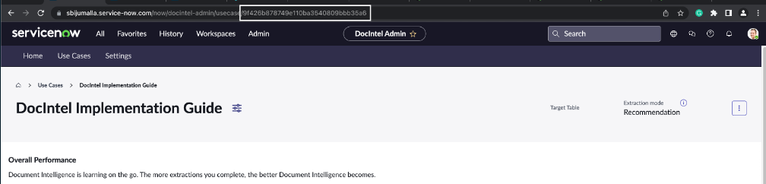
- From the URL copy the sys_id and paste to a text editor.
Example from the below image ‘9f426b878749e110ba3540809bbb35a6’ is the sys_id
- Now Switch to Background Scripts tab and paste the sys id in the first line for the variable “TASK_DEFINITION_TO_EXPORT_SYS_ID”.
Note: The first line of the script will look like below:
var TASK_DEFINITION_TO_EXPORT_SYS_ID = "9f426b878749e110ba3540809bbb35a6"; - Set the "EXPORT_TASKS" boolean to false if you don't want to include tasks in the update set
- Now Run background script in global scope, this will take few minutes to execute.
!*Note: The above script can only be run as a background script in global scope. The script will not work as expected if used as a Fix Script or UI Action. etc. - Navigate to System Update Sets > Local Update Sets, you will find some update sets with names start with the name of task definition.
- Click into each update set where name contains "global update set" and "global update set task x-y", and click Export Update Set Batch to XML in Related Links to download XML files.
Note: In the name “global update set task x-y”, x-y refers to range of task that are part of update set. If you have 100 document tasks, you will find two batch update sets with following in the name “global update set task 1-50” and “global update set task 51-100”.
- Navigate to System Definition > Scripts – Background
- Importing Use case to another instance:
- Navigate to System Update Sets > Retrieved Update Sets
- Under Related Links, click on Import Update Set from XML
- Choose the XML file for "global update set" and 'Upload' it
- Open the “global update set” record.
- Click Preview Update Set Batch.
- There may be few errors for di_extracted_values, "Could not find a record in di_image for column image referenced in this update". This is because those extracted values are empty and do not have a di_image. You can safely choose ‘Accept remote update’.
- There should not be any other errors. Now you can Commit Update Set Batch.
- Repeat step 3 - 7 for all the task update sets
- Navigate to System Update Sets > Retrieved Update Sets

If you are unable to retrieve update sets into your target instance, follow the below steps:
- Check for the file size.
- Navigate to System Properties => Import Export.
- Under Import Properties update XML Format "Maximum file size for import (MB)" field to be higher than the file size.


View original source
https://www.servicenow.com/community/ai-intelligence-articles/how-to-migrate-and-deploy-trained-document-intelligence-use/ta-p/2538011