
Install ONE Plugin and Enable Agents to Reach Employees in Teams from ServiceNow!
Import
·
Apr 11, 2023
·
article
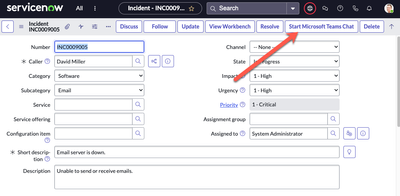
In this article, you'll learn how to enable your Agents to reach employees in Teams directly from ServiceNow.
To enable this feature, ensure that you've followed the pre-requisites below.
| Pre-Requisite | Details |
|---|---|
| Teams and ServiceNow Integration | If you havent already, please follow the steps here: Getting Started! 3 Simple Steps to Integrate Microsoft Teams and ServiceNow! |
| Plugins | Please ensure at least one following plugins are installed:1. IT Service Management integration with Microsoft Teams 2. HR Service Delivery integration with Microsoft Teams Alternatively, you can install "ServiceNow for Microsoft Teams" |
| Step | Preview of Step |
|---|---|
| Step 1: Click on "Start Microsoft Teams Chat" from an Incident / Case / Request |  |
| Step 2: Move the 'Caller' from "Recommended" to "Selected" and select "Continue Chat" |  Clicking on Continue Chat will open the Teams client Clicking on Continue Chat will open the Teams client |
| Step 3: Engage with the Employee in Teams |  Notice a Teams conversation between the Agent and Caller has been created Notice a Teams conversation between the Agent and Caller has been created |
| Step 4 (Optional): Import Messages from Microsoft Teams | After a resolution has occurred, the Agent has the option to "Import Messages from Microsoft Teams" as  |
View original source
https://www.servicenow.com/community/ms-teams-articles/install-one-plugin-and-enable-agents-to-reach-employees-in-teams/ta-p/2528603