
Auto-Populate Reference data in Service Catalog
If you are looking to populate the data from the Reference variable this article will help you to achieve.
Note: This will be available on Utah version.
No scripting required for this.
1. I have created a catalog with 3 variables as below.
a. Requested For(Reference -sys_user)
b. Manager (Single Line Text)
c. Department (Reference -cmn_department)
Use case: Whenever user selected on the Requested For, need to populate the manager and Department of that user on corresponding variables.
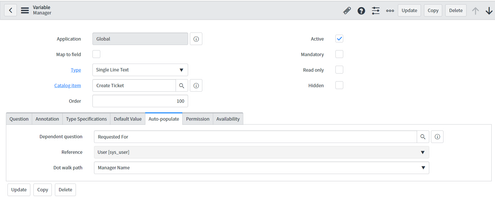
2. Once you create the variables go to the manager variable form it has Auto-populate tab where we can select the reference variable on a Dependent question and select Requested For and on Dot walk path select the manager name. Refer below

3. Now go the Department variable and click on Auto-populate tab and select the Dependent question as Requested For and on Dot walk path select the department. Refer below

4. Result:
Once selected the Requested For Data will populate as below

Hope it will be helpful to you.
https://www.servicenow.com/community/developer-articles/auto-populate-reference-data-in-service-catalog/ta-p/2528336