
Usage of "CUSTOM WITH LABEL" variable type to display a styled/fancy URL
Use case : There are instances where the customer might ask you to place a URL on the Service Catalog form so that the end user can navigate to a certain page by hitting the same. In this case , "CUSTOM WITH LABEL" (earlier knows as Macro With Label) variable type can be used to build fancy URLs.
Solution: Consider a scenario where we would like to place a URL link on the catalog form which will take us to Create Incident form in ServiceNow . This will be a dynamic url adjusting based on the environment(DEV,QA,PROD etc.) that we are into.
Step 1 : Create a widget named "Generate URL" with the following code :
Server Script :
(function() {

    var baseURL=gs.getProperty('glide.servlet.uri');        //Returns the base URL
    data.url=baseURL+options.extended_url;

})();
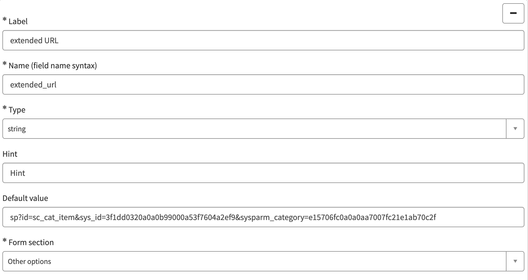
The options schema in the above code on the server contains the following component :

HTML Template :
<div>
  <a href='{{data.url}}'>Click here to raise an incident</a>
</div>
CSS :
a:link, a:visited {
  background-color: #f44336;
  color: white;
  padding: 14px 25px;
  text-align: center;
  text-decoration: none;
  display: inline-block;
}

a:hover, a:active {
  background-color: red;
}

Step 2 : Once the widget is created , create a catalog variable of type "Custom with Label". Go to the T*ype Specifications* of the variable and tag the widget as shown below :

Boom !! your styled/fancy URL is ready to be viewed on the portal. This is how it looks in my case :
https://www.servicenow.com/community/developer-articles/usage-of-quot-custom-with-label-quot-variable-type-to-display-a/ta-p/2480840