
Recertifying your app with code changes
All applications on the ServiceNow Store undergo a certification process before publication.
In addition to the initial certification, ServiceNow Store apps can require:
- Recertification on a newer ServiceNow release
- Recertification for a new app version (code changes)
Recertifying for new ServiceNow releases
If you already have a certified application listed on the ServiceNow Store and do not intend to make any changes to the code or current listing, you can recertify the app for a new ServiceNow release. For more information see Recertifying your app for new ServiceNow releases
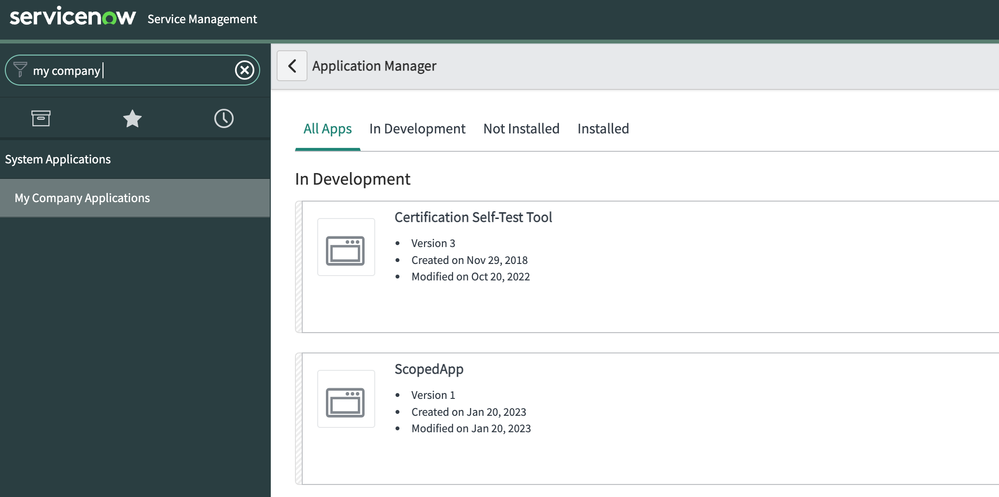
If you already have a certified application on the ServiceNow Store and intend to make changes to the code or its listing, you must re-submit the app for app and listing re-certification. For example, you have created a scoped application called "ScopedApp" v1.0.0 which is already certified and published in the Store, and want to update its version to v.1.0.1 because you have new features or have fixed defects.
Because you have changed the code, you will need to get it re-certified before you publish it to the Store so that existing customers can get this update. Prior to submitting the new version for re-certification please make sure to test your application, run through your entire Test Plan, and ensure that everything is in working order.
How to recertify an app with code changes
From within your Vendor instance (venXXXXX.service-now.com) navigate to your application record
- Navigate to System Applications > My Company Applications
- Search and select your Application Name. Make sure to increment the version i.e. to v1.0.1

https://www.servicenow.com/community/app-publisher-blog/recertifying-your-app-with-code-changes/ba-p/2477671