
ServiceNow with ChatGPT Integration
It's time to integrate ServiceNow with ChatGPT. Hope it will help you.
Reference links:
Refer below :
curl https://api.openai.com/v1/completions \
-H "Content-Type: application/json" \
-H "Authorization: Bearer YOUR_API_KEY" \
-d '{"model": "text-davinci-003", "prompt": "Say this is a test", "temperature": 0, "max_tokens": 7}'
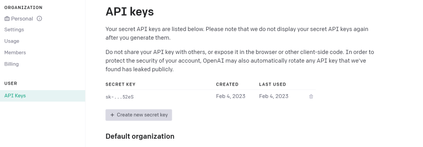
- API key Creation Link: Need to create API key using below link and use it on header.
https://platform.openai.com/account/api-keys
Refer below:

Below are the 3 steps required to complete this integration.
1. Create a ChatGPT table with Question, Answer, Request, Response, Status code are string fields.
2. Create REST Message and Post HTTP method to update the data on ServiceNow.
3. Create Async business rule and use given script and give your names.
Step 1. Create ChatGPT table and below are the fields which I have created. Create your own fields.

Step 2: REST Message and Post HTTP method with No authentication on Authentication type.
Note: Authorization should be Bearer YOUR_API_KEY
Rest Message:

POST HTTP Method:

Content:
{"model": "${model}","prompt": "${prompt}","max_tokens": ${max_tokens},"temperature": ${temperature}
}
Step 3. Async Business rule insert/update on the ChatGPT table and give specific condition as below example.
Ex: Question changes(condition)
Script:
(function executeRule(current, previous /*null when async*/ ) {
    try {

        var r = new sn_ws.RESTMessageV2('ChatGPT', 'POST');//give your rest mesage name and method name
        r.setStringParameterNoEscape('model', "text-davinci-003");
        r.setStringParameterNoEscape('prompt', current.u_question);//give your field name
        r.setStringParameterNoEscape('max_tokens', 100);
        r.setStringParameterNoEscape('temperature', 0);

        var response = r.execute();
        var responseBody = response.getBody();//it will give the response body
        var code = response.getStatusCode();//get status code

        var responseObj = JSON.parse(responseBody);
        current.u_request = r.getRequestBody();//it will give the request body
        current.u_response = responseBody;
        current.u_status_code = code;
        current.u_answer = responseObj.choices[0].text;//it will give the text from response
        current.setWorkflow(false);
        current.update();
        current.setWorkflow(true);

    } catch (ex) {
        var message = ex.message;
    }

})(current, previous);
Screenshot:

Results: when you give question and Save on ChatGPT table then we will get the response.

Will get Response as below.

To make to easy and understandable to everyone, I have provided the all the details with screenshots.

Page 2
It's time to integrate ServiceNow with ChatGPT. Hope it will help you.
Reference links:
Refer below :
curl https://api.openai.com/v1/completions \
-H "Content-Type: application/json" \
-H "Authorization: Bearer YOUR_API_KEY" \
-d '{"model": "text-davinci-003", "prompt": "Say this is a test", "temperature": 0, "max_tokens": 7}'
- API key Creation Link: Need to create API key using below link and use it on header.
https://platform.openai.com/account/api-keys
Refer below:
Below are the 3 steps required to complete this integration.
1. Create a ChatGPT table with Question, Answer, Request, Response, Status code are string fields.
2. Create REST Message and Post HTTP method to update the data on ServiceNow.
3. Create Async business rule and use given script and give your names.
Step 1. Create ChatGPT table and below are the fields which I have created. Create your own fields.
Step 2: REST Message and Post HTTP method with No authentication on Authentication type.
Note: Authorization should be Bearer YOUR_API_KEY
Rest Message:
POST HTTP Method:
Content:
{"model": "${model}","prompt": "${prompt}","max_tokens": ${max_tokens},"temperature": ${temperature}
}
Step 3. Async Business rule insert/update on the ChatGPT table and give specific condition as below example.
Ex: Question changes(condition)
Script:
(function executeRule(current, previous /*null when async*/ ) {
    try {

        var r = new sn_ws.RESTMessageV2('ChatGPT', 'POST');//give your rest mesage name and method name
        r.setStringParameterNoEscape('model', "text-davinci-003");
        r.setStringParameterNoEscape('prompt', current.u_question);//give your field name
        r.setStringParameterNoEscape('max_tokens', 100);
        r.setStringParameterNoEscape('temperature', 0);

        var response = r.execute();
        var responseBody = response.getBody();//it will give the response body
        var code = response.getStatusCode();//get status code

        var responseObj = JSON.parse(responseBody);
        current.u_request = r.getRequestBody();//it will give the request body
        current.u_response = responseBody;
        current.u_status_code = code;
        current.u_answer = responseObj.choices[0].text;//it will give the text from response
        current.setWorkflow(false);
        current.update();
        current.setWorkflow(true);

    } catch (ex) {
        var message = ex.message;
    }

})(current, previous);
Screenshot:
Results: when you give question and Save on ChatGPT table then we will get the response.
Will get Response as below.
To make to easy and understandable to everyone, I have provided the all the details with screenshots.
https://www.servicenow.com/community/developer-articles/servicenow-with-chatgpt-integration/ta-p/2468472