
Flow execution across domains - yes you can!
Foreword
This article expects basic level of knowledge of Domain Separation, its concepts and functional behaviour. Additionally, the basic understanding of Flow Designer and Decision Tables will help the reader to understand the contents of this article
Introduction
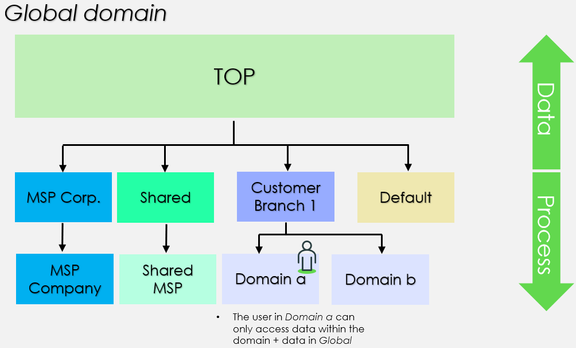
The primary use of Domain Separation is to separate data, processes, and administrative tasks into logically defined domains. Especially, Domain Separation is used to separate data. I.e., D omain a does not have visibility to data in D omain b and vice versa. This is when:
- A particular domain is not a parent/child to another domain
- A particular domain does not contain/is not contained by another domain

Additionally, the standard behaviour prevents any customer to see any data of the service provider. Often, service providers have so called shared data to support their service delivery for multiple customers, but this data is only accessible by the service provider itself using the contains domains and/or visibility domains options.
Flow execution in domain separated instance
Enforced data separation applies to many background automations as well. For example, a flow triggered in Domain a for a Requested Item will execute in Domain a:
- A flow is configured in G lobal domain – used by various catalog items to streamline and standardize certain service delivery of the service provider
- Customer a submits a catalog item associated with the flow
- One of the created task records is a Requested Item in Domain a
- The flow then triggers against the Requested Item – and inherits Domain a as its execution context + inherits the Domain a as the scope of data visibility
What if it would be desired to have the flow now executing in Domain a to do some automation leveraging data in another domain? This could be facilitated for example by:
- The contains domains feature – simple to setup but would allow all Domain a users to see the target domain data. Likely a no-go due to security, compliance and contractual reasons.
- Duplicating data across domains and defining a master record – not simple and does not support manageability nor user experience to say the least.
I’ll outline an approach which requires neither of the above options. Let’s start with setting the scene with a sample scenario.
A cross domains flow execution - s ample scenario
- Customer a in Domain a still submits that specific catalog item
- Requested Item gets created in Domain a
- An agent of the service provider picks up the request and enriches it by populating a background reference variable x – some data residing in the Shared MSP domain
- We would now like to have the flow to run some automation in the Shared MSP domain with a flow using the variable x. But oops, we cannot. The flow is executing in Domain a which has absolutely zero visibility into the Shared MSP domain. Therefore, the flow cannot see the value of variable x either.
Let us next see an example approach to facilitate the desired job execution.
A cross domains flow execution - e xample approach for the sample scenario
Step 1 - flow action configuration
We need ScriptableFlowRunner to be incorporated in a new flow action – configure action once, reuse across flows. As you can guess, the ScriptableFlowRunner can be used to trigger flows and subflows. More importantly, it enables defining the domain where the triggered flow executes.
We will use minimal mandatory inputs for our scenario:
- Requested item record
- The name of a subflow
These inputs are passed on to the ScriptableFlowRunner in order to:
- determine which subflow we want to trigger
- make the Requested item record available for the triggered subflow
The action could look like this:

I’ll just have this example action always trigger a subflow in the G lobal domain. The preferred domain could be an additional input for the action.
Step 2 - subflow configuration
We need a subflow that does the magic job execution for us. This is the subflow that is triggered by the above action.
Step 3 - decision table configuration
We will leverage Decision Tables to determine:
(a) which of our subflows should execute when the main flow executes – let us avoid complex if-else logic within the main flow and configuring something which only works for one customer served by the service provider. Let’s have a very simple setup for this:

- E.g., should we give inputs Catalog Item and Customer a, we’d get Subflow x returned
(b) approvals – in this scenario we will facilitate customer specific approvals which are often needed... and again avoid complex if-else logic within the main flow. Let’s have a simple setup for this as well:


- E.g., should we give inputs Catalog Item and Customer a, we’d get Customer a approvers returned
Step 4 - flow configuration
We need to put it all together - a flow which is something like this:

I’ll briefly note what takes place per each action in the above sample flow:
- Interaction with our approvals decision table to determine which approvers we should engage
- Approvals facilitated by a subflow for which we will provide the step 1. decision result
- Check whether approval approved/rejected
- Do something if rejected – here execution just bluntly ended
- Some task(s) to facilitate proper request fulfilment – here we tell the agent to populate variable x and wait for the task completion
- Interaction with our subflows decision table to determine which subflow should be triggered in the context of current Requested Item
- Our custom action execution using ScriptableFlowRunner. The action triggers the subflow from step 6. decision result in the G lobal domain. The subflow is aware of the original Requested Item while having access to the _variable x. T_he triggered subflow is not restricted by a domain context and can execute that little magic automation across domains.
Ending words
I hope you found this piece of writing interesting and helpful. Often, combining various powerful platform features together can enable that little piece of magic – even without unnecessary customisation.
https://www.servicenow.com/community/workflow-automation-articles/flow-execution-across-domains-yes-you-can/ta-p/2447842