
UI Builder Component: Node Map
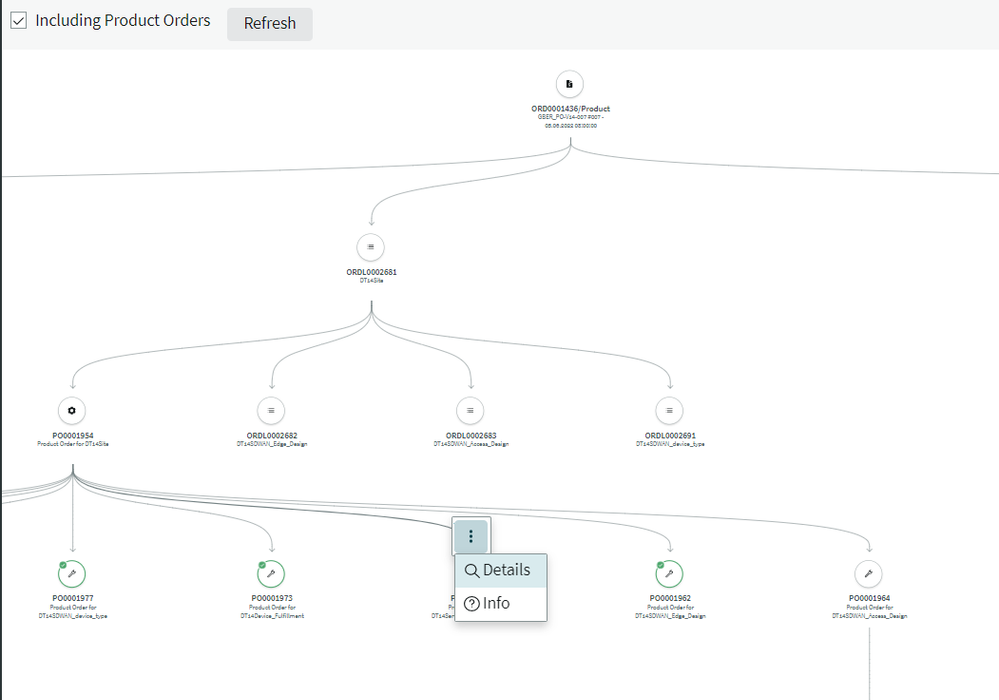
Node Map is a good component to visualize Top-Down-Structures.
Examples of use cases:
- SAFe: Structure of Epics/Stories/Tasks
- PPM: Structure of Programs/Projects/Subprojects/Project Tasks
- TSM/OMT: Customer Order/Order Line Items/Domain Orders/Tasks
To display a node map 2 arrays of data must be prepared: Nodes and Edges
Example of nodes:
[{ "id": "2fd12eca1b70d91053f075d8cd4bcb4b#sn_ind_tmt_orm_order#in_progress", "viewData": { "primaryLabel": "ORD0001422/Product", "secondaryLabel": "GBER_PO-V14-007 #009 - 21.07.2022 08:00:00", "icon": "contract-history-fill" } }, { "id": "2fd12eca1b70d91053f075d8cd4bcb4e#sn_ind_tmt_orm_order_line_item#in_progress", "viewData": { "primaryLabel": "ORDL0002524", "secondaryLabel": "DT14SDWAN_Network", "icon": "list-fill" } }, { "id": "8c622a8e1b70d91053f075d8cd4bcb80#sn_ind_tmt_orm_product_order#3", "viewData": { "primaryLabel": "PO0001551", "secondaryLabel": "Product Order for DT14SDWAN_Network", "icon": "gear-fill", "status": " positive" } }
]
I have used the default viewData object.
Decoration with icons is a good idea to visualize the type of a node. The list of defined icons are available here:
https://developer.servicenow.com/dev.do#!/reference/now-experience/tokyo/now-components/now-icon/gal...
The status attribute is useful to highlight components in the structure.
The node status can be used to displayed an indicator icon in the corner of the avatar.
Type: ("none" | "positive" | "error" | "warning")
Default: "none"
Examples of edges:
[{ "id": "line#2fd12eca1b70d91053f075d8cd4bcb4e#sn_ind_tmt_orm_order_line_item#in_progress", "sourceId": "2fd12eca1b70d91053f075d8cd4bcb4b#sn_ind_tmt_orm_order#in_progress", "targetId": "2fd12eca1b70d91053f075d8cd4bcb4e#sn_ind_tmt_orm_order_line_item#in_progress" }, { "id": "line0#8c622a8e1b70d91053f075d8cd4bcb80#sn_ind_tmt_orm_product_order#3", "sourceId": "2fd12eca1b70d91053f075d8cd4bcb4e#sn_ind_tmt_orm_order_line_item#in_progress", "targetId": "8c622a8e1b70d91053f075d8cd4bcb80#sn_ind_tmt_orm_product_order#3" }, { "id": "line1#78626a8e1b70d91053f075d8cd4bcbb7#sn_ind_tmt_orm_product_order#5", "sourceId": "8c622a8e1b70d91053f075d8cd4bcb80#sn_ind_tmt_orm_product_order#3", "targetId": "78626a8e1b70d91053f075d8cd4bcbb7#sn_ind_tmt_orm_product_order#5" }, { "id": "line1#dc622a8e1b70d91053f075d8cd4bcbb0#sn_ind_tmt_orm_product_order#5", "sourceId": "8c622a8e1b70d91053f075d8cd4bcb80#sn_ind_tmt_orm_product_order#3", "targetId": "dc622a8e1b70d91053f075d8cd4bcbb0#sn_ind_tmt_orm_product_order#5"
}]
Please remember: The id’s must be unique over all nodes and edges. Otherwise, the Node Map is not drawn.
Example page:

https://www.servicenow.com/community/next-experience-articles/ui-builder-component-node-map/ta-p/2395910