
Creating new Declarative Action Assignments in the sys_declarative_action_assignment table
 Arnoud Kooi
We all like navigating to table list via table_name.list and we love to do it via /table_name *
In the case of the Action Assignments table, there are two caveats that this article tries to address!
So when creating new records in the Declarative Action Assignment table (sys_declarative_action_assignment) using a handy shortcut is not your best option!
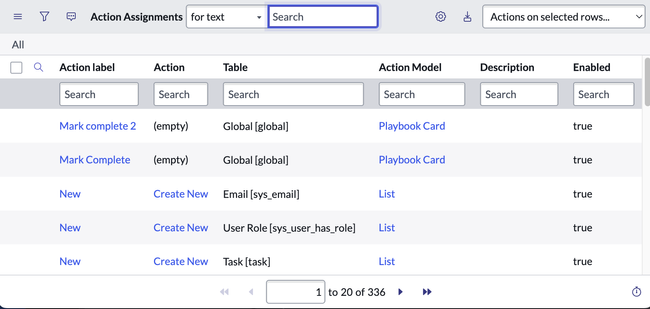
In case you do, you'll probably see something like the one below.

No New button?! what is going on, an ACL issue?
When looking into this, it turns out that the New UI Action, specific for this table, has a scripted condition. This hides it when the default view is selected.
After figuring this out and changing a view we do get the New button!

Good, let's try it, and fill in the form!

After filling in the form and saving it, we get the message:
The following mandatory fields are not filled in: Action Model
But that is a field not on the form?!
With /tn > form fields * an or /uh * we can easily see this is a hidden field on the form, but what's going on?
Well it turns out that when you use the navigator to open the table list for example:
All > Playbook Experience > Actions > Activity Actions
This includes a query parameter to filter the action model to only show the ones of type Playbook Card

Now when creating the new button from here will result in prefilling the Action Model field with Playbook Card, so when we now fill in and save the record, everything will work as expected.
So the moral of the story?!
Action Assignments are used in the platform in various ways, each with a Form View and Action Model reference.
Be sure to use the navigator to search and click the appropriate option to make sure you're able to create the record in the right way!
Bonus tip: With the new SN Utils navigator search*, you can get a quick idea of what the different use cases are.
Use /all table_name
The all will narrow down to only the all section, excluding (most of) history, favorites, etc.

This implementation of the search also includes the table name of the URL.
so including that gives a nice overview of all occurrences of items that link to that specific table list or view in the navigator.
In the below example, we can get an overview of the different variations where Declarative Action Assignments are leveraged.

*) These are references to SN Utils functions. I am the author of SN Utils!
https://www.servicenow.com/community/next-experience-articles/creating-new-declarative-action-assignments-in-the-sys/ta-p/2394930