
Next Experience Quick Start Guide
| Center of Excellence / Next Experience / Next Experience Quick Start Guide |
|---|
Welcome to the Next Experience Quick Start Guide
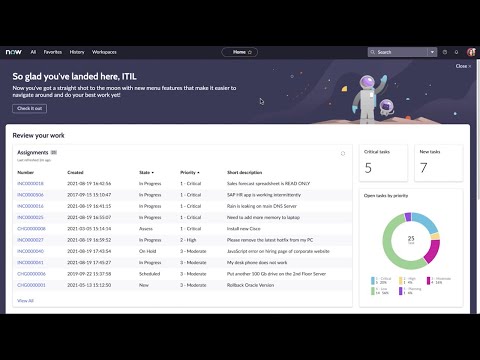
If you're just starting your Next Experience journey, then you've come to the right place. This guide will help you understand what Next Experience is, how it works in tandem with our Workspace UI, and is a great place to return to as our products evolve over time. For a quick overview, watch this video:
Overview
Next Experience delivers a consumer grade, intuitive, personalized experience to drive productivity, improve engagement, and seamlessly ties in with our new workspace experiences. The Unified Navigation header in Next Experience enables users to access content across the instance in a single pane, simplifying access to the items they need to work. Users can access the Core UI and dashboards in the same pane as their workspaces. Navigation and favoriting has been made easier with the Contextual App Pill. High-level features of Next Experience include:
- Modern, consumer grade experience that can be tailored to an organization's branding.
- Translucent menu overlays that free up screen real estate, and provide the flexibility for sidebar navigation via pinning.
- Unified Navigation header allows users to navigate back and forth between Core UI applications and modules and configurable workspaces.
- Contextual App Pill displays where a user is at in the instance and allows for easy favoriting.
- Persona-driven landing pages that present content specific to a user's role and tasks.
Before You Get Started
Before you get started with Next Experience, check and consider the following:
| Customer Type | Are you a new or upgrade customer? New customers will have Next Experience enabled by default, and can begin configuring and working in their instance with Next Experience right away. Upgrade customers will have to activate Next Experience upon upgrade to San Diego+ and may need to remediate customizations. |
|---|---|
| Customizations | If you're upgrading from a previous release, you need to validate the level of customization you've made to your instance. We suggest performing normal upgrade and/or regression testing when activating Next Experience in a sub-production instance. The following modifications may need to be remediated when activating Next Experience, for more information see the product documentation: Customized user interface, for example hard-coded styles or UI Scripts. Adopted a classic workspace and want to adopt a new configurable workspace. Created custom components in classic workspace and want to adopt a new configurable workspace. |
| Feature Support | Check the product documentation for functionality that is not supported, and verify your instance is not using this functionality or there is a migration plan to replace unsupported functionality. Also, check out our new Next Experience Readiness Tool that will check your instance for usage of these features so you can make more informed decisions. |
| Workspace Status | Identify whether you have teams working in a classic workspace or not. Classic workspaces can be continued to be used in San Diego and Next Experience, but will not take advantage of the Unified Navigation features i.e. classic workspaces will open in their own browser tab, nor can they be configured with the new full-featured UI Builder. If you are a current classic workspace user, consider how you will migrate to a configurable workspace either before or shortly after Next Experience is activated. We encourage customers who are not using workspaces to begin exploring our configurable workspace solutions after upgrading to San Diego+. |
| Release Strategy | Consider how you will deploy Next Experience to your production instance. It is highly recommended to activate Next Experience in your sub-production environment, and perform upgrade/regression testing to ensure your instance is operating as expected. Remediate any prior user interface customizations and activate Next Experience with any remediations as part of your organization's normal release process to make the configuration changes in your production instance. |
Steps to Quick Success
| Step 0: Next Experience architecture and terminology Learn about Next Experience either via our product documentation or free NowLearning courses. Step 1: Upgrade to San Diego+ Upgrade to San Diego+ on a sub-production instance if you haven't already. The Next Experience UI is available starting with the San Diego release. We encourage you to read the family version release notes and follow your normal upgrade process. For helpful information see the upgrade planning checklist. If you're new to upgrades, check out our NowLearning course: ServiceNow Upgrade Essentials. Step 2: Activate Next Experience Review the product documentation for considerations for activating Next Experience. Make necessary remediations to customizations prior to activating Next Experience in production. Plan for replacing unsupported features such as Connect Chat or Connect Support prior to activating Next Experience. Make decisions on unsupported features such as Guided Tours, Live Feed, etc. prior to activation. Step 3: Configure Next Experience Prior to or shortly after activating Next Experience, plan to brand Next Experience to your organization's branding colors by applying a theme. If desired, create user-selectable color choices in your theme with the use of variants. If you're a new customer and haven't already, begin tailoring your landing pages to your user's personas. Upgrade customers can continue to utilize dashboards, but we encourage customers to begin exploring landing pages at this time to see if landing pages can replace and enhance their current dashboards. If your organization has implemented classic workspaces and hasn't replaced them yet, begin your strategy for migrating to configurable workspaces and if you haven't used workspaces yet, start to explore our new product workspaces to replace your processes in the classic environment. Step 4a: Learn about the Workspace UI A workspace is a suite of tools that provides personas such as agents, case managers, service desk professionals, managers, and other process users with the tools to assist customers quickly, and perform process based tasks. Step 4b: Explore our product workspaces We've released new product workspaces with the San Diego release that can be configured in the full-featured UI Builder. Our workspaces enable you to deliver personalized experiences that engage teams and enhance productivity. We encourage your organization to explore our product workspaces before building a custom workspace for a process. Step 5: Explore further with training Now that you've implemented Next Experience UI and explored how it works seamlessly with workspaces, you're ready to take the next step into configuring and customizing workspaces and landing pages with UI Builder. Bonus: Stay up to date with the Next Experience Academy The Next Experience Academy is a series of live sessions focused on Next Experience topics such as the Next Experience UI, UI Builder, Components, Workspaces, and more. The academy occurs monthly, on every third Wednesday of the month at 12pm EST. Sessions include a mix of presentation, demo, and live Q&A. Join our product and engineering teams for information on all things Next Experience such as best practices, guidance, and more. Sessions will be recorded and hosted on YouTube. |
|---|
Resources

https://www.servicenow.com/community/next-experience-articles/next-experience-quick-start-guide/ta-p/2331929