
Enhanced chat experiences for Virtual Agent available in Yokohama Patch 3/Xanadu Patch 9
 New article articles in ServiceNow Community
·
May 14, 2025
·
article
New article articles in ServiceNow Community
·
May 14, 2025
·
article
 Victor Chen
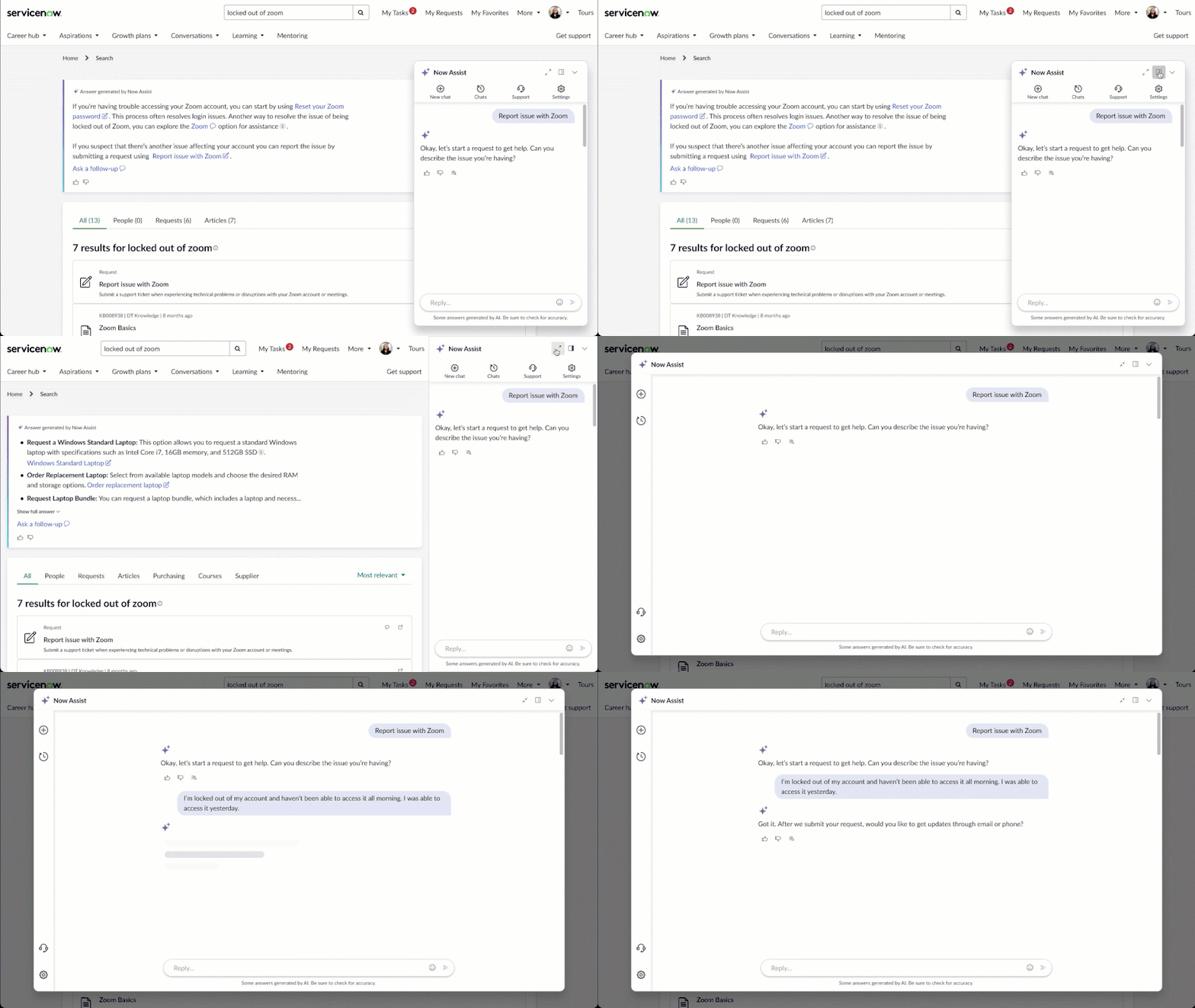
A more dynamic chat experience is now available with Virtual Agent!
Enhanced chat is the new conversational experience that includes a dynamic, movable, and resizable chat window, allowing users to choose their own mode of engaging with Virtual Agent on their ServiceNow portals from a variety of entry points with multiple active conversations. For example, you can seamlessly flow from a search bar to a conversational experience.*

Features:
- Ability to re-size, move, and expand chat window in portal
- Retrieve past chat history
- Have multiple active conversations at once, with separate notifications
- Access the chat experience directly from the portal search bar or search results
- Seamlessly switch between conversation and search results
How to set up:
Requirements: Xanadu Patch 9+/Yokohama Patch 3+
1. Navigate to Conversational Interfaces > Assistants setup page. From the Assistant setup guide, navigate to "Display Experience".
2. In the Portals tab, select a portal to enable, e.g., Employee Center. Then click on the three-dot menu on the right hand side, and click "Edit settings." On new Yokohama instances, you'll be automatically prompted when adding a portal for the first time.

3. You'll then see the option to either keep standard chat, or use the new enhanced chat.

You can also enable this for the Now Mobile app. Click on the Mobile tab and select either the search widget or chat launcher you want enabled for enhanced chat.

Result:

More new features for Now Assist in Virtual Agent:
- Document upload and Q&A - upload any PDF or Word file and use Now LLM to ask questions regarding the document. Enable this feature via the checkbox in the "Chat Experience" setup page.

- Suggested actions - Receive proactive suggested actions after certain questions and requests. Enable this features with system property: sn_nowassist_va.enable_suggested_actions

- AI Agents for Now Assist in Virtual Agent - End-users can now call upon Now Assist AI Agents for self-service. Enable Virtual Agent as a display option in your AI Agent's "Define availability" page. Learn more here.**

*Not available in out-of-box CSM portal (/csp).
**Agentic workflows (aka "use cases") are currently not visible in Now Assist in Virtual Agent.
https://www.servicenow.com/community/virtual-agent-nlu-articles/enhanced-chat-experiences-for-virtual-agent-available-in/ta-p/3264079